You can lose a good job without ever losing the part. The quote was too skinny, the setup got longer than anyone expected, and the floor spent a full day making money for the customer while your shop absorbed the pain. That's the problem a machining cost calculator is supposed to fix, if it's built like a real financial model instead of a quick price lookup.
Table of Contents
When a Bad Quote Costs More Than a Good Part
A 50-piece bracket job is where bad estimating usually shows up. The estimator looks at the print, multiplies cycle time by the spindle rate, and sends a number that feels competitive. Then the setup takes longer than planned, the fixture needs one more tweak, the first article gets checked twice, and the job goes out late and underwater.
That's more than lost margin. It throws off the day's schedule, pulls a machinist off other work, and leaves the customer wondering why the due date slipped after a clean quote. A bad quote also trains the floor to distrust the office, which is expensive in a different way.
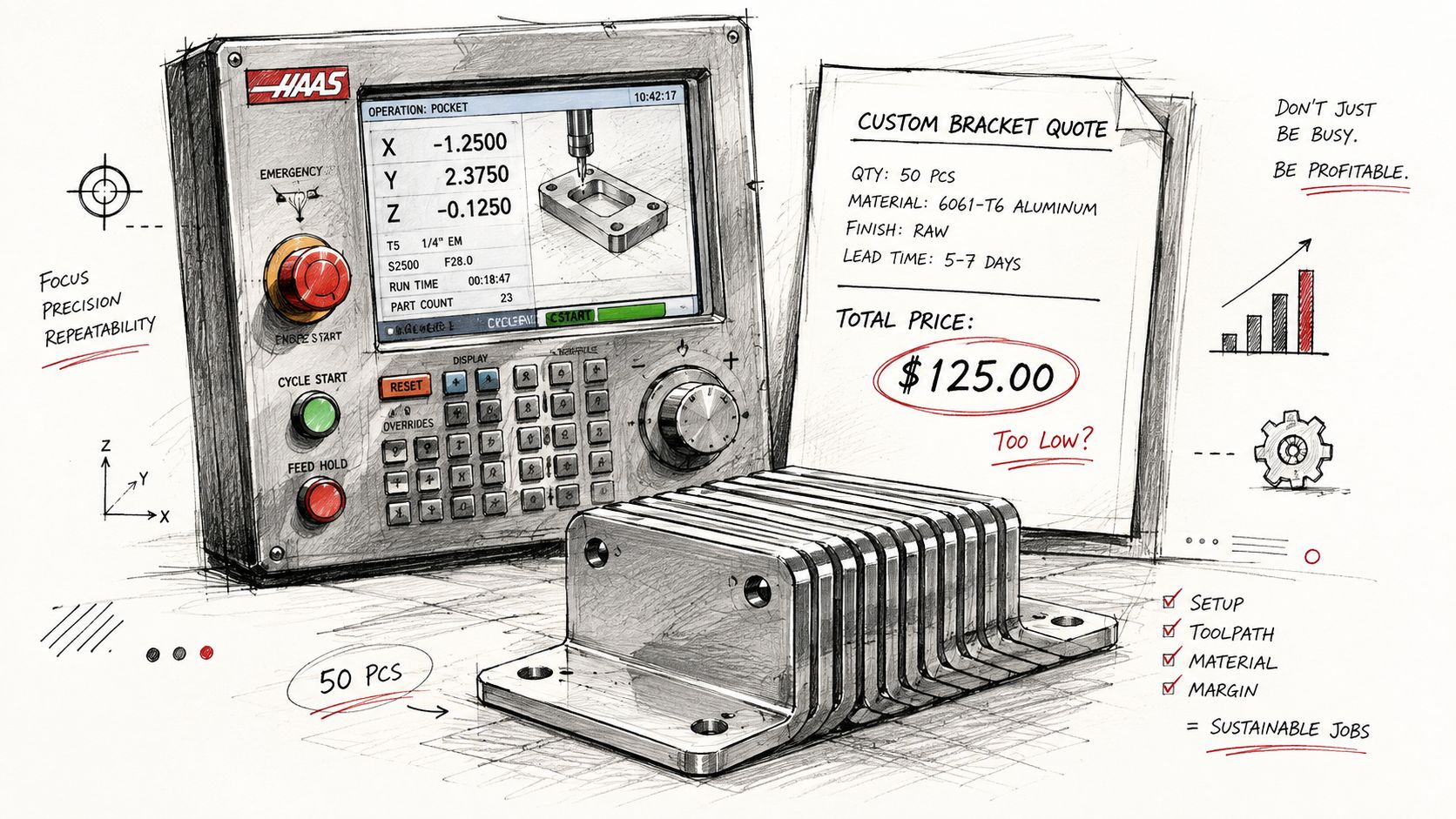
A real machining cost calculator forces every assumption onto the page before chips start flying. It should combine material, machine time, setup, tooling, overhead, and margin into one number that can survive RFQ review, not just a quick gut check. Trade groups and quoting guides keep coming back to the same structure, because the financial damage from skipping one cost bucket always shows up later in the week Forgemrp job-shop quoting guide.
A quote that ignores setup doesn't stay wrong by a little, it stays wrong on every part after the first one.
The shop owner's job is to protect the shop from itself. That means the calculator has to catch the hidden labor, the fixture time, the machine burden, and the profit target before the job is accepted. If it can't do that, it's just a prettier way to guess.
The Building Blocks Inside Every Machining Cost Calculator
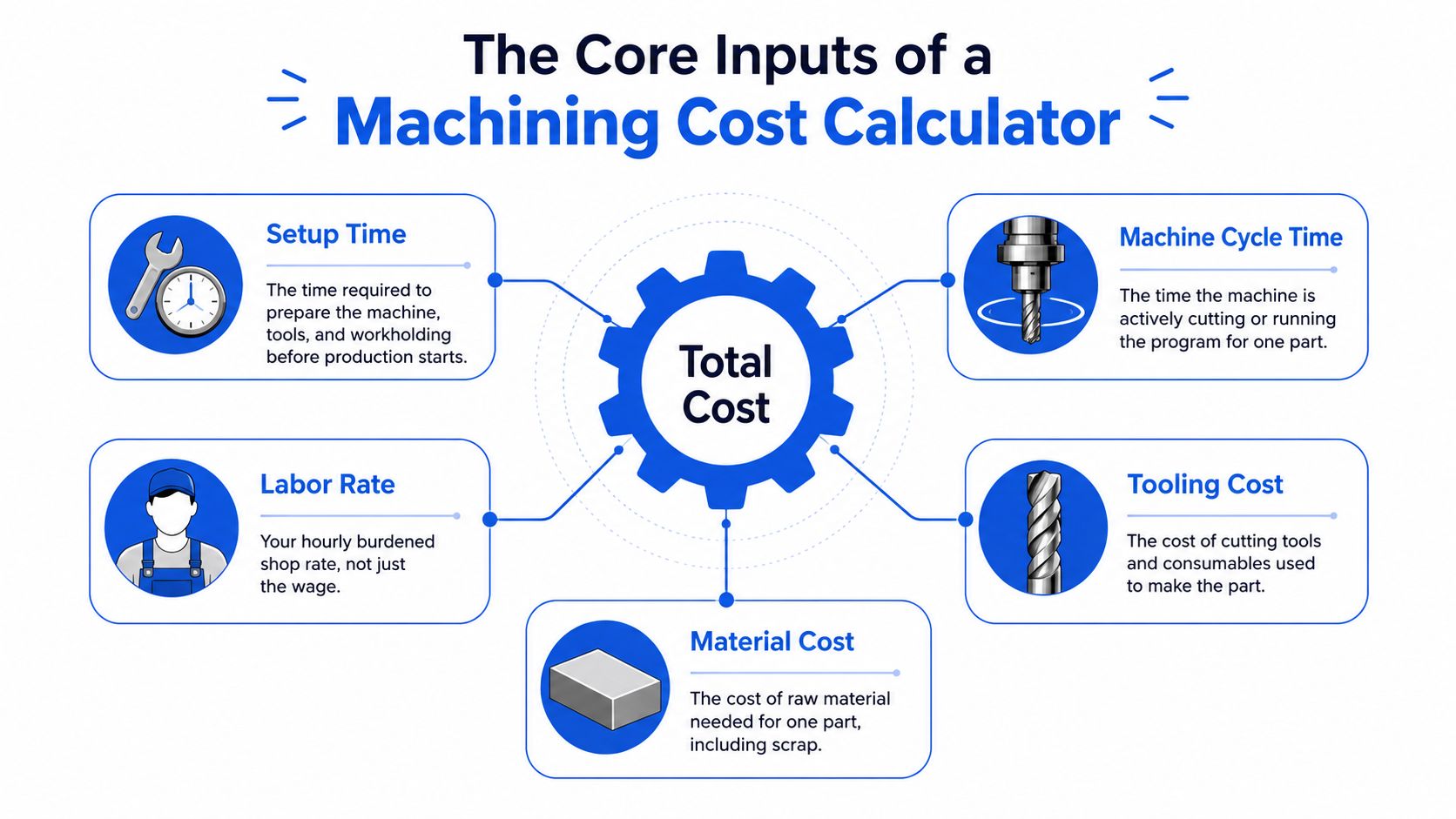
A useful calculator starts with plain shop inputs, not fancy software language. The core pieces are setup time, machine cycle time, labor rate, tooling cost, material cost, and overhead burden. Those six inputs tell you whether a job is worth running.
Setup time is fixed per batch, which is why small jobs get crushed by it. Cycle time scales with quantity, so a part that runs cleanly at 100 pieces can look overpriced at one piece if the setup is spread the wrong way. Tooling cost needs to be amortized across expected tool life, and that number changes when the material gets abrasive or the finish gets tighter.
Material cost is straightforward on the surface, but it isn't just a stock price. Sheet area, bar length, scrap allowance, and cut size all matter. Overhead burden is the catch-all for the costs no one sees on the machine screen, like rent, software, utilities, planning time, and the rest of the shop's fixed load.
Practical rule: if a calculator doesn't separate setup from cycle time, it'll usually underquote low-volume work.
The easiest inputs to estimate are often the least dangerous. An experienced programmer can get close on cycle time and labor, especially for repeat work. The inputs that sink jobs are overhead allocation and tooling life, because those are easy to shrug off and hard to recover later.
For a clean way to estimate one of the inputs that tends to get fuzzy, see this material cost estimating resource. A calculator becomes credible when it keeps those pieces separate and lets you see where the money really goes.
Building a Loaded Shop Rate You Can Defend
A loaded rate only works when it comes from a full year of operating numbers. Pulling a round figure out of thin air feels fast, but it falls apart the first time someone asks what's inside it. The better route is to total the annual cost of keeping the machine and the shop available, then divide that by billable hours.
That logic has been around a long time. Trade guidance on machine-shop rates still starts with wages, billable days, billable hours, and overhead expenses before it builds an annual overhead percentage, and it still points back to historical jobs as the best reality check MIE machine-shop rates.
What belongs in the rate
A loaded shop rate should reflect more than spindle wear. It has to absorb machine ownership, labor burden, utilities, consumables, software, rent, and the margin you need to stay in business. If the machine is only cutting while the shop is paying for everything else, then the calculator has to load that unused time into the hourly rate somewhere.
A simple way to think about it is this. The shop rate is not the cost of one machine's metal removal. It's the cost of making that machine available to bill profitably.
Cost Category | Annual Amount | Notes |
|---|---|---|
Direct labor | Included in shop burden | Used as the base for overhead allocation in common quoting practice Forgemrp job-shop quoting guide |
Annual overhead | Included in shop burden | Often allocated as a percentage of labor or per machine-hour rate Forgemrp job-shop quoting guide |
Operating burden | Included in shop burden | Covers utilities, rent, software, and other non-cutting costs |
Desired margin | Included in shop burden | Added after the shop cost is loaded |
Billable hours | Divisor | Only the hours you can realistically sell count |
The main mistake is confusing clock hours with billable hours. A machine can sit on the floor all day and still not generate revenue for all of those hours. Salaried programmers and downtime also get hidden fast if you don't load them into the model.
A loaded rate that can't survive a customer audit isn't a rate, it's a placeholder.
The point isn't to create a perfect accounting model. The point is to build a rate that ties back to real cost and can defend itself when a customer pushes back on price. That's what keeps the estimate honest.
Running a CNC Part Through the Calculator
Take a 6061-T6 aluminum bracket with three milled features, two drilled holes, and a tapped M6 boss. It looks simple enough until you price the work. The setup is where a lot of shops get trapped, because the part may only cut for a short time while the fixturing, probing, and first-piece checks eat the clock.
How the number gets built
Start with the setup. If the bracket needs a vise stop, a custom soft jaw, and a careful first article, that's not the same job as dropping stock into a fixtureless run. The calculator should assign setup once, then spread it across the quantity so the batch price reflects the amortization.
Then come the cutting steps. Roughing removes the bulk of the material, finishing passes clean the faces, drilling handles the two holes, and tapping adds another operation with its own tooling wear. The cycle time gets multiplied by the loaded shop rate, then tooling, deburr, and inspection get added as separate line items. Recent quoting guides keep separating those buckets for a reason, because finishing and inspection can shift the price far more than people expect sr-mfg finishing guidance.
Cost Line | 1-piece Prototype ($) | 50-piece Batch ($/part) |
|---|---|---|
Setup and program prove-out | High, because it sits on one part | Low, because it's spread across the run |
Cycle time | Full burden on one part | Burdened by quantity |
Tooling | Full effect on one part | Amortized across the batch |
Fixturing | Full effect on one part | Reduced per part |
Deburr and inspection | Full effect on one part | Lower per part, but still real |
The same bracket can swing hard between prototype pricing and production pricing because setup allocation changes the math. A single-piece quote has to absorb the whole fixture effort, while a 50-piece run spreads that burden and usually looks much more reasonable. That's why quantity breaks matter so much in quote review.
Fixturing complexity, tolerance-driven inspection, and any secondary finishing are the variables that move the final number fastest. If the print calls for more checks, more handling, or more rework risk, the calculator has to catch that before the job lands on the floor.
Adapting the Calculator for Sheet Metal Jobs
Sheet metal pricing follows the same financial logic, but the dominant cost driver shifts. In CNC machining, cycle time usually carries the quote. In sheet metal, material utilization often matters more because nesting, grain direction, and bend planning can change what the part really costs.
A 304 stainless bracket with a 2 mm laser-cut blank, two bends, and powder coat shows the difference clearly. Stainless is commonly priced at about 2 to 3 times mild steel Lya machining sheet metal bending cost, so the material choice already changes the baseline before the first cut. Thickness also raises cutting time, tool wear, and forming force, which means the quote has to reflect more than blank size.
What gets loaded into the sheet metal model
The first cost driver is nesting efficiency. If the blanks waste space on the sheet, the material burden rises fast. Then comes kerf loss, which is small on a single part but very real across a run. Press brake setup needs to be allocated across bend count, and if the brake operator has to stop and verify angle or alignment, that labor belongs in the quote.
Cost Component | Calculation Basis | 10-piece Run ($/part) | 100-piece Run ($/part) |
|---|---|---|---|
Stainless blank material | Sheet usage and scrap allowance | Higher per part | Lower per part |
Laser cutting | Program time and cut path | Higher per part | Lower per part |
Bending | Setup spread across bend count | Higher per part | Lower per part |
Powder coat | Batch threshold and handling | Higher per part | Lower per part |
Hardware or weld prep | Added operations | Higher per part | Lower per part |
A separate sheet metal quoting workflow usually needs the same discipline as machining, just pointed at different losses. That's why it helps to keep the estimation method tied to the actual job flow, not just the machine type. For a focused reference on that side of the shop, use this sheet metal quoting resource.
The biggest misses are the quiet ones. Grain direction charges, hardware insertion, and secondary weld prep often get forgotten because they don't show up in the first cut list. On higher volumes, sheet metal can become more cost-effective than machining because the setup gets diluted and the material usage stays efficient, but only if the calculator tracks those line items.
Why Online Calculators Miss the Shop-Specific Details
A generic calculator can give you a budget number, but it can't know your floor. It doesn't know actual spindle utilization, real scrap rates, custom tooling markups, inspection throughput, or the burden hiding in non-billable hours. Those gaps are why two shops with similar equipment can still quote differently.
The risk gets worse when the tool treats every machine like it runs at the same pace and every shop like it carries the same load. Real quoting depends on how you handle downtime, fringe costs, software, and internal handling. If one shop absorbs those costs differently than another, the price can diverge even before the material is ordered.
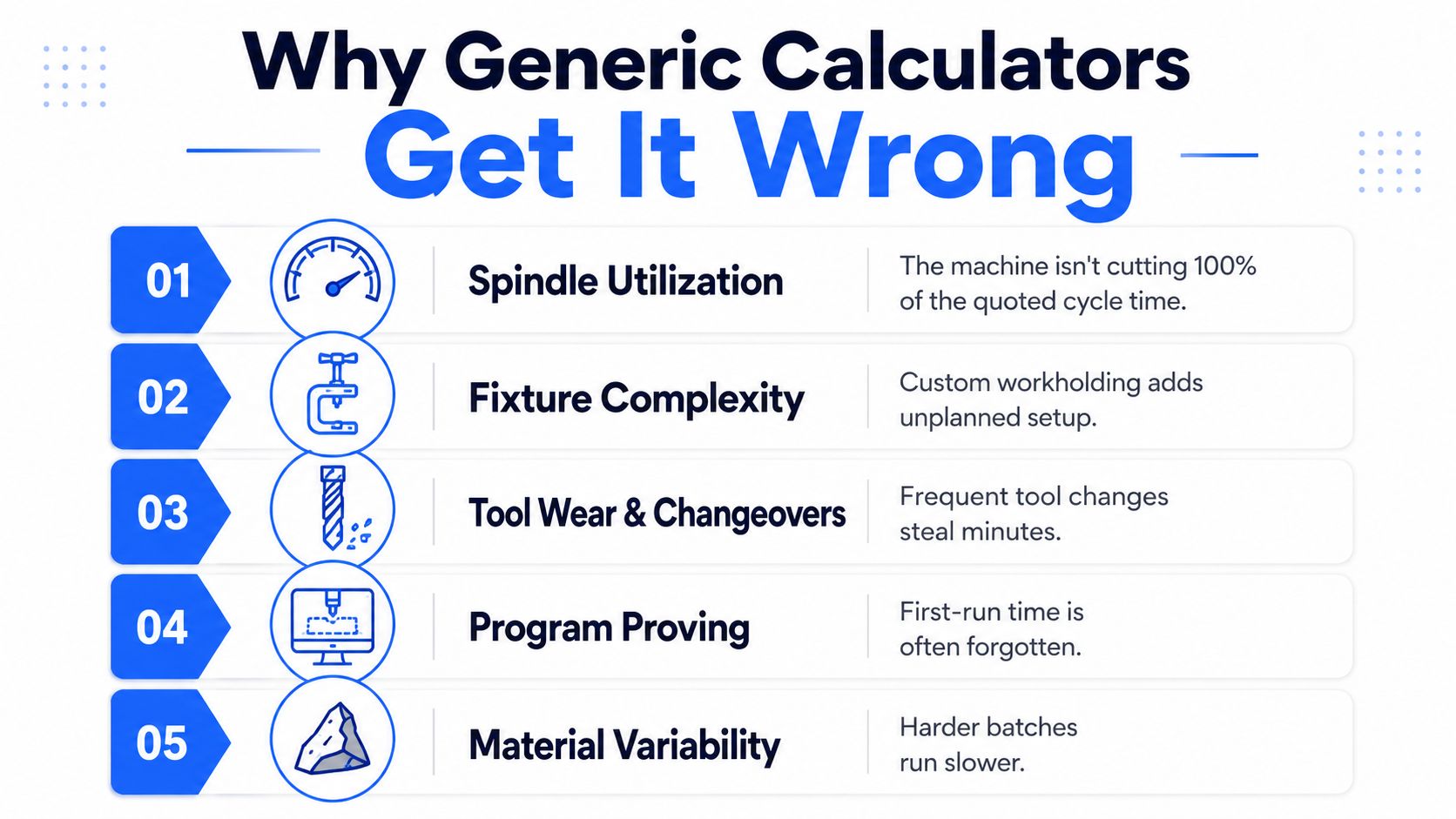
The smartest way to use an instant calculator is as a starting framework. Some newer quoting systems are moving toward systems that ingest drawings, emails, and order context, because the main problem isn't just math, it's missing information Hymson laser CNC cost estimator. That lines up with what shops already know from the floor, a quote is only as good as the inputs behind it.
Generic tools are fine for rough screening. They're not enough when the job has unique setup, finish, or inspection demands.
If the calculator doesn't reflect your own production data, it's not quoting your shop. It's quoting an average shop that doesn't exist.
Turning Estimates Into a Repeatable Quoting Habit
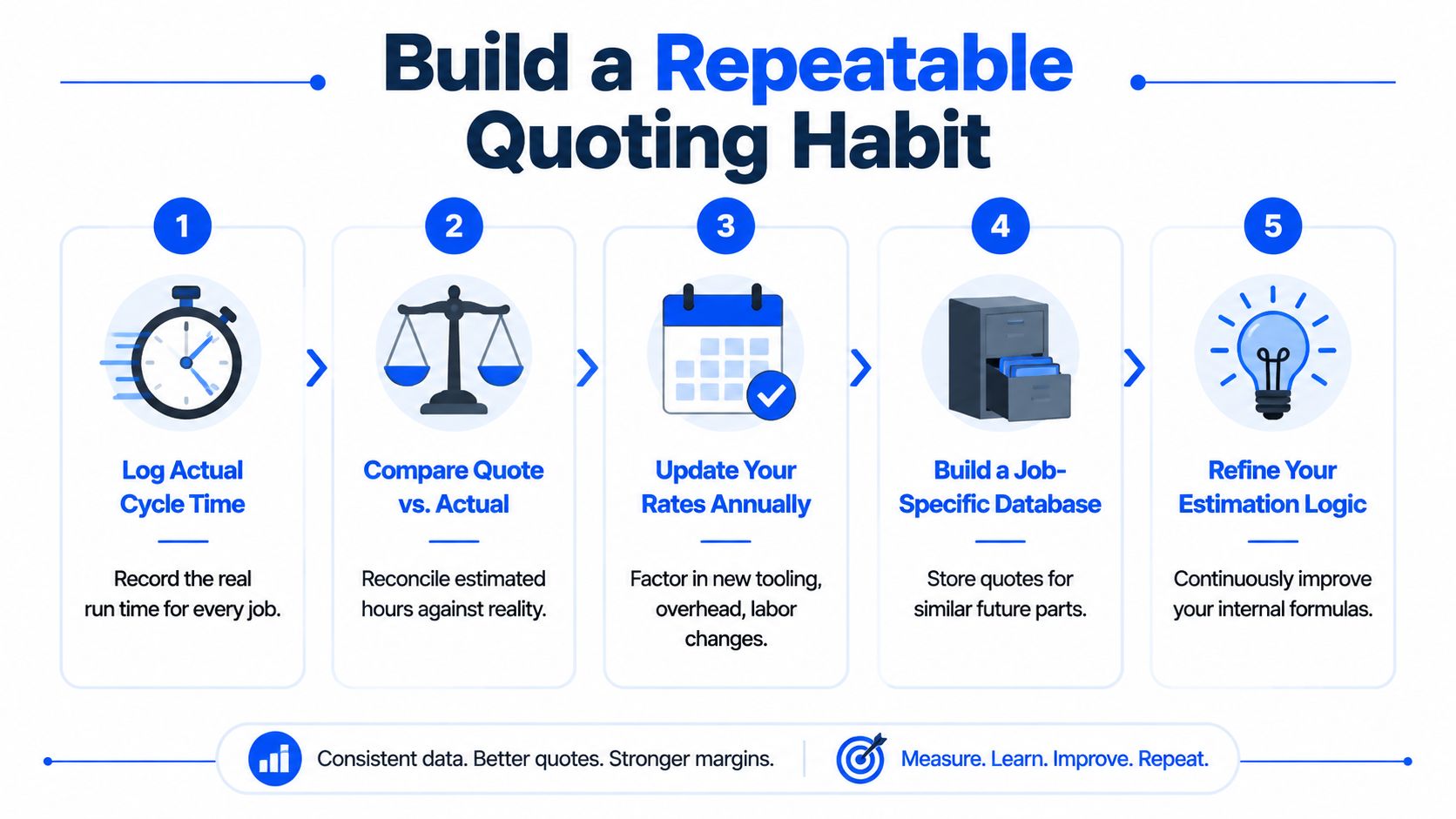
The shops that stay sharp treat quoting like a feedback loop, not a one-time guess. They capture actual cycle time after every run, reconcile quote versus actual hours every month, and keep setup and tooling data by part family so the next estimate starts closer to reality. Scrap and rework deserve their own quarterly review, because those losses have a way of hiding inside “normal” job cost.
Modern quoting software is pushing this even further. Systems are starting to pull live machine data, inventory levels, and historical margins into the estimation flow, which shrinks the gap between estimating and live costing. That's the direction the market is moving, whether a shop is ready for it or not.
The habit that pays off
A practical workflow looks simple on paper. Log the run, compare the quote, update the rates, store the part history, and tighten the logic on the next quote. The discipline matters more than the software brand, because the shop that learns from every job will usually quote tighter and protect margin better than the shop still running on memory.
For a closer look at how RFQs move through a shop before they become a quote, this typical machine shop RFQ process guide is a useful reference.
A machining cost calculator works best when it behaves like a living financial model of the shop. That means the numbers get updated from the floor, not from habit, and the next quote gets better because the last one was measured.
If you're trying to tighten quote turnaround and keep your pricing tied to real shop data, Uptool gives CNC and fabrication teams a way to organize RFQs, extract part details, and build estimates from the actual files and emails that come in. Visit Uptool to see how that fits into a machining and sheet metal quoting workflow.
