Monday morning at a CNC shop starts the same way it always does. The estimator's staring at three inboxes, a supplier PDF, two drawing revisions, and a buyer who wants a number before lunch. The shop floor's waiting on a release decision that stalled in somebody's out-of-office reply, and the problem isn't quoting skill, it's that RFQs keep arriving faster than anyone can sort them.
That's why RFQ management software matters. Not because it makes prettier quotes, but because it keeps requests from disappearing, helps you decide what's worth quoting, and gets the right job in front of the right person before the buyer moves on. In manufacturing, the clock matters. Industry benchmarks put standard RFQ turnaround at 3-5 days and complex RFQs at 7-10 days, while quoted RFQs typically win at 20-35% on average, which is exactly why response discipline matters so much MFGCAL RFQ tracker. Another benchmark pegs average quoting at 3.8 days for general job shops, 4.5 days for precision machining, 2.4 days for sheet metal and fab shops, and 1.2 days for the top 10% across types manufacturing quoting speed benchmarks.
What you should care about | What actually moves the needle |
|---|---|
RFQs that get seen | Central inbox capture and clear routing |
RFQs that get answered fast | Triage rules and same-day ownership |
RFQs worth pursuing | Capacity fit, margin, and customer value |
Quotes that win | Shorter response time and cleaner qualification |
If you're already buried in email, you're not shopping for a fancy quoting toy. You're looking for a system that keeps good work from falling through the cracks.
Table of Contents
What RFQ Management Software Actually Solves for Job Shops
The first thing it fixes is the disorder before estimating starts. A Monday queue may contain an urgent bracket job from a repeat buyer, a one-off fabrication request from a new prospect, and a portal notice buried beneath two quote revisions. Without a system, the estimator becomes the router, reminder, and memory for every request.
The core job is intake control
RFQ management software should centralize intake, sort requests, and assign ownership before a promising job goes stale. Response speed is the operating benchmark. One benchmark found that quotes sent within the first 4 hours had the highest win probability, with a 10 to 20 percentage point gap compared with quotes sent after 48 hours speed and revenue benchmark. The same source reported win rates of 38% to 42% for quotes submitted within 24 hours, falling to 10% to 15% by five days.
That is a revenue leak caused by intake failure, not a cosmetic software problem.
Practical rule: if the RFQ has no owner within minutes, it is already drifting toward lost business.
Owners need control, not more clutter
A machine shop or fabricator should see active RFQs, overdue RFQs, and pipeline value in one view. Those measures show what is moving and what is stuck RFQ tracker metrics. The system should also separate RFQs received, quotes sent, and same-week quotes. They represent different operating states and should not be merged into one vanity total dashboard design for shops.
The buying question is simple: can the software stop your team from missing a good job, pursuing a poor fit, or leaving a buyer without an answer while competitors respond?
A clear typical machine shop RFQ process shows where those handoffs commonly break. Choose software that closes those gaps in the inbox first, then supports estimating.
The Five Core Jobs an RFQ Platform Must Do
A shop-grade platform has to own the full request-to-decision loop. If it only stores documents, or only helps write quotes, it's not solving the actual problem. The five jobs are simple, but most systems handle only one or two of them well.
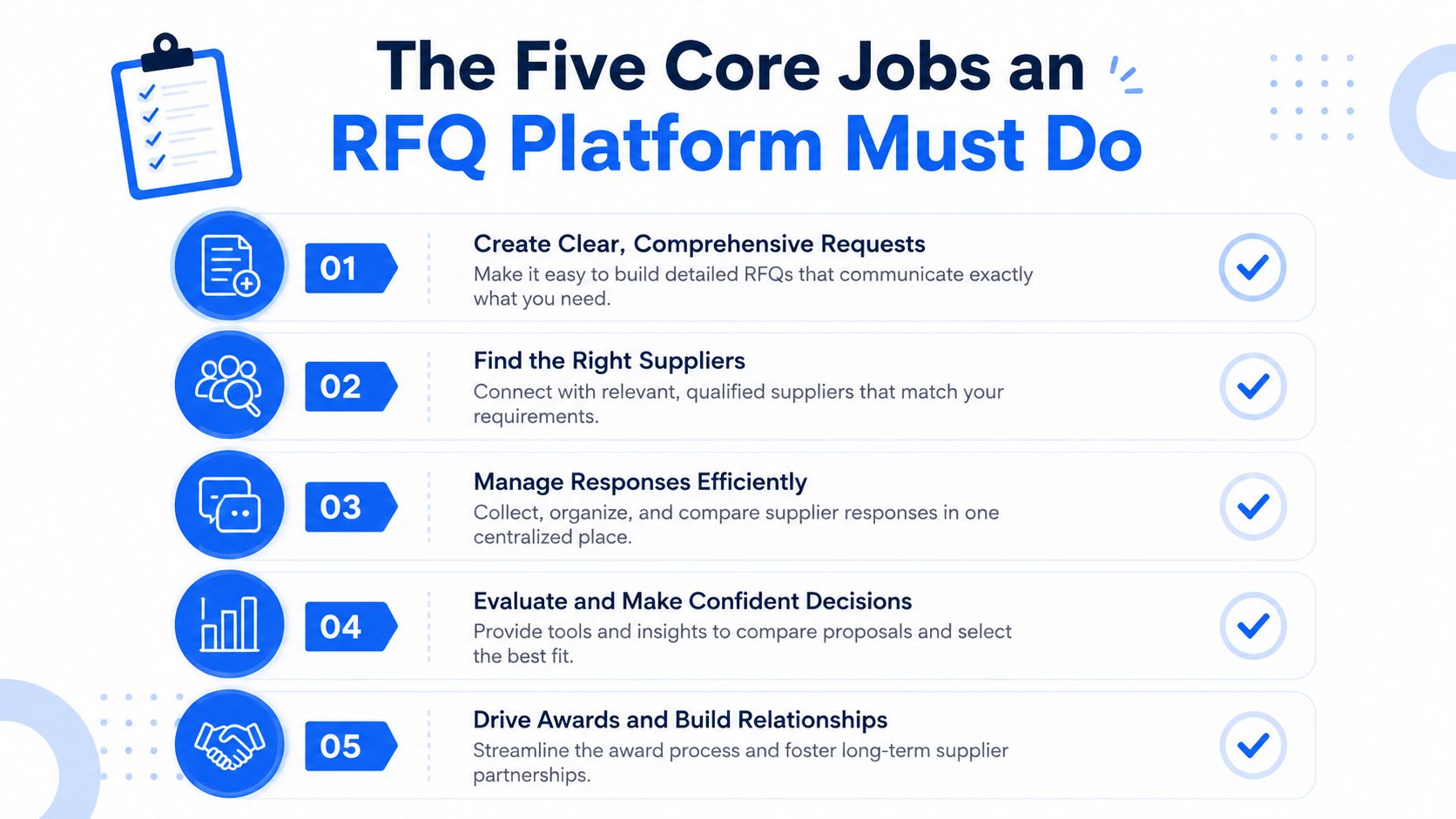
1. Consolidate intake
The platform has to pull requests out of email, portals, and other channels into one place. If your team still checks multiple inboxes, you don't have a quoting system yet, you have a scavenger hunt. This matters even more because a major industry benchmark cited in 2026 found only 45% of submissions go through online portals, which means most requests still arrive through email or similar channels email-first RFQ management gap.
2. Qualify the work
A good platform helps you decide whether the RFQ fits your capability, material list, tolerance range, and volume appetite. That's the difference between quoting everything that lands in the inbox and quoting the work you can win profitably.
3. Triage the queue
Priority scoring should reflect capacity, account value, deadline pressure, and repeat-customer status. The software has to make the urgent work obvious, not just searchable.
4. Assemble the quote
The platform should pull together drawings, specs, notes, and pricing inputs into a clean response. It doesn't need to replace the estimator, but it should cut out the repetitive copying and re-keying that kills speed.
5. Turn activity into decisions
Analytics matter because they show what gets won, what gets lost, and what keeps stalling. A useful system makes pricing and capacity decisions better over time instead of letting every quote disappear into a folder after it's sent.
One industry comparison of RFQ management tools scored Procurify 9.2/10 overall, Ivalua 8.6/10, and Zycus 7.3/10, which tells you something important, feature breadth doesn't automatically equal better value or easier use platform comparison. The same logic applies on the shop floor, you don't buy the biggest feature pile, you buy the system that keeps requests moving.
Intake Models Compared Email Portals and ERP Bundles
Not every shop should run intake the same way. A 5-axis aerospace shop, a structural steel fabricator, and a mixed fab-and-machine operation all receive work differently, so the software has to match the way buyers send RFQs.
Intake Model Compared for CNC and Fabrication Shops | Best For | Strength | Weakness | Example Shop |
|---|---|---|---|---|
Email-first | Relationship-driven shops, repeat buyers, small teams | Easy for customers, fast to adopt | Lost context, manual triage, scattered attachments | A 5-axis machine shop quoting direct from buyer emails |
Buyer portal | Shops serving procurement-heavy customers | Structured submission and traceability | Portal fatigue, more friction, lower response volume | An aerospace supplier handling formal procurement requests |
ERP-bundled | Mid-sized operations with tight production and job-cost control | Closed-loop data from quote to schedule | Rigid forms, less flexible intake for non-standard work | A structural fabricator tied closely to production planning |
Email-first is still the most realistic starting point
Email-first works when customers send PDFs, STEP files, and notes straight to an estimator. The problem is that the inbox becomes the system of record whether anyone likes it or not. Without automation, the shop owns the request only as long as somebody remembers to move it.
If you want to improve that workflow without forcing buyers into a new portal, use a form layer that lets you build structured intake around messy submissions. A useful reference on that approach is how to build dynamic forms, especially if you're trying to standardize material, finish, and quantity details without annoying repeat customers.
Portals fit compliance-heavy buyers, not every shop
Portals make sense when the customer demands audit trails, structured fields, and supplier controls. They also introduce friction, because every portal adds another login and another submission path. That's fine when the order is large enough to justify the pain. It's a waste when the RFQ volume depends on speed and responsiveness.
ERP-bundled intake works when the shop is already mature
An ERP bundle helps when the same data needs to feed quoting, scheduling, and costing. That closed loop is useful, but the form logic can be too rigid for custom CNC, mixed fabrication, and tricky finishing jobs. If your business wins on flexibility, don't let a rigid intake screen scare away the very work you're built for.
Triage and Prioritization Workflows That Prevent Lost Orders
If you're running a small shop, triage has to be fast and boring. That's a compliment. The best workflow doesn't look flashy, it just makes sure nobody misses the RFQ that should've been quoted yesterday.
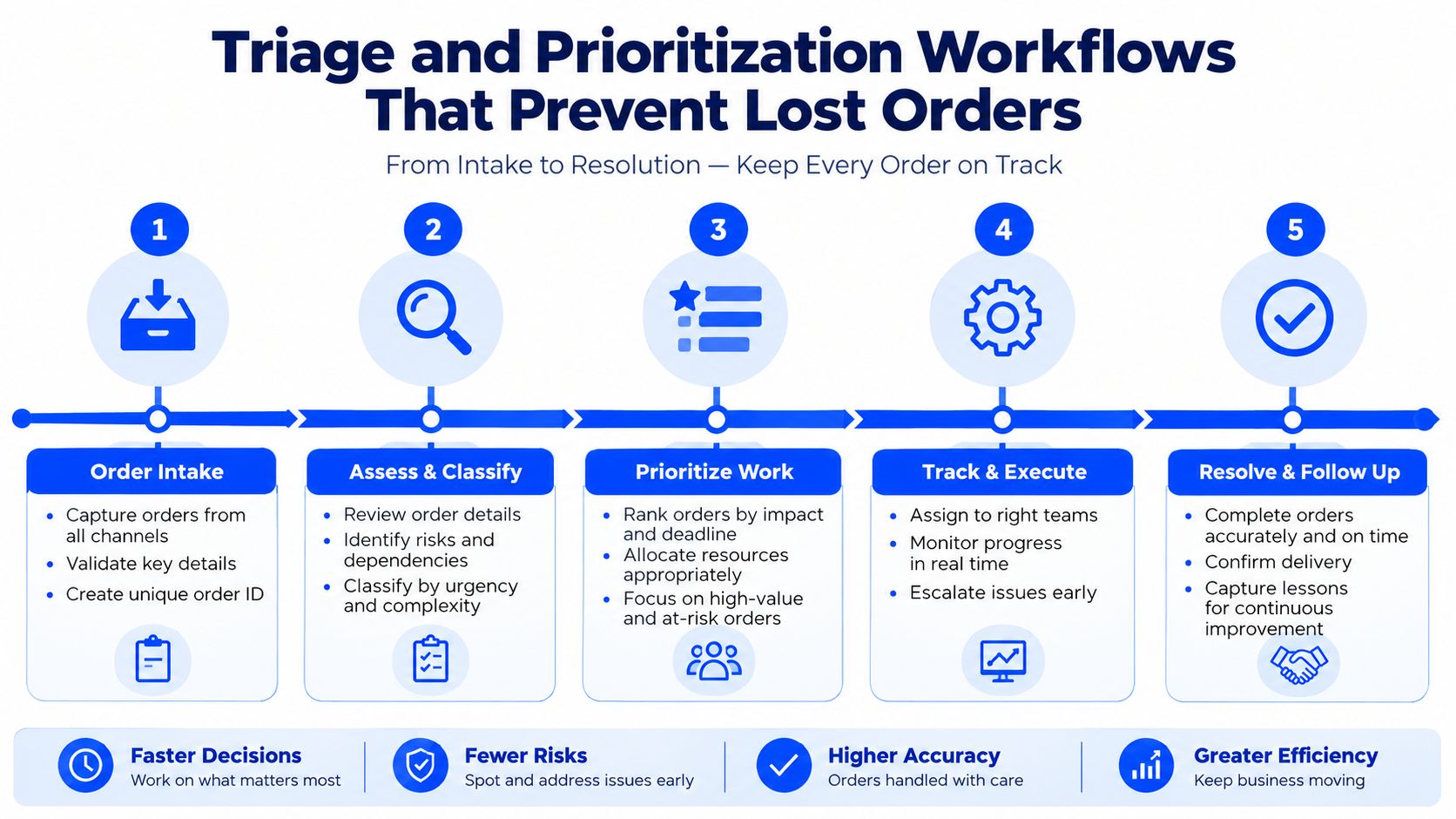
The first 30 minutes should be about sorting, not estimating
Skim subject lines, flag large drawings, and separate buyer emails from planner follow-ups. If the RFQ came from a repeat account, it should get a different treatment than a random one-off asking for a rush job with no usable print notes. Rule-based auto-tagging saves time, because the software can label request types before the estimator opens every message.
The first 2 hours should force a bid or no-bid decision
A machine shop can't quote everything and expect good results. Tie the decision to margin, available capacity, and account value. Good platforms also show capacity-overlap warnings against the shop calendar so you don't accept work that will collide with already-loaded machines or finishing bottlenecks.
Shop-floor rule: if the RFQ can't be qualified inside the first two hours, it's probably not a priority job.
A simple heat score helps here. Combine repeat-customer status, likely PO probability, and margin fit, then push the hottest requests to the top. That's not fancy AI. It's just disciplined triage.
End the day with every open RFQ assigned
Every request needs a status and an owner before the team goes home. No exceptions. If you want a Monday team huddle target, use first response under 4 hours and qualified quote back in 48 hours as the baseline speed and revenue benchmark. For very small manufacturers, industry guidance recommends an instant acknowledgement, then a qualified first response within 5 minutes, and a first quote within 60 minutes manufacturer SLA guidance.
The point is simple. Tracking, triaging, and prioritizing RFQs is as important as estimating them. If the front end is sloppy, the quote at the end won't save you.
Automation Across the RFQ to Quote Workflow
Automation should remove handoffs, not judgment. That's the line buyers should keep in mind when vendors start talking like every drawing can be priced by magic.
What can be automated and what still needs a human
Intake is the easiest place to automate. A good system can parse inbound emails, sort attachments, and extract basic part data from drawings and files. Enrichment can also be automated, especially when the software pulls customer history, prior margins, and repeat request patterns into view.
Costing is where the hype usually outpaces reality. A platform can flag DFM concerns, suggest cycle-time assumptions, and pull raw material references, but it still needs an estimator when the part has tight tolerances, tricky fixturing, or an unusual finishing sequence. Delivery can be partially automated too, with quote letters, reminders, and follow-up cadences generated from templates.
Don't buy the demo fantasy
If a vendor says it can price every part instantly, ask what happens when the drawing needs programming review. If it claims to quote tight tolerances without checking fixturing, that's not automation, that's guesswork.
Automation Reality Check by RFQ Stage | Claimed Capability | Reality for Job Shops |
|---|---|---|
Intake | Auto-read emails and files | Useful for sorting and extracting basics |
Enrichment | Pull customer and job history | Helpful, but only if your data is clean |
Costing | Instant part pricing | Estimator review still matters on complex work |
Delivery | Auto-generate quote letters and follow-ups | Real and valuable for speed |
Approval | Fully unattended award decisions | Needs human review in most shops |
One useful lens comes from broader automation guidance for small and mid-sized businesses, especially around picking rules-based work first and keeping humans in control where judgment matters business automation per la PMI. That's the right mindset here too.
My test is blunt. Ask any vendor which two stages are unattended and which still need an estimator in the loop. If they dodge that question, they're selling marketing, not workflow.
How Leading Platforms Handle CNC and Sheet Metal Scenarios
A drawing-first platform and a workflow-first platform solve different pain. If your shop does CNC machining and sheet metal, both matter, but one of them is probably hurting you more today.
Platform Archetypes on Real CNC and Sheet Metal RFQs | Drawing-First Platform | Workflow-First Platform |
|---|---|---|
5-axis aerospace bracket with tight GD&T | Pulls features from PDFs or STEP files and surfaces DFM issues fast | Routes the RFQ quickly, but costing stays estimator-led |
Sheet metal enclosure with 8 bends and powder coat | Spots bend issues, finish notes, and manufacturing complexity | Makes sure the RFQ doesn't get lost in email or delayed |
Complex revision with new buyer notes | Better at structured part analysis | Better at revision tracking and ownership |
Short turnaround rush request | Faster path to a defensible number | Better at keeping response time disciplined |
Drawing-first wins when the part itself is the bottleneck
If your team gets buried under a tight GD&T drawing and a part that needs engineering attention, a drawing-first platform helps a lot. It gets you to a defendable quote faster because it pulls geometry and features into the process instead of asking the estimator to do every step by hand. That's especially useful on a 5-axis aerospace bracket or a sheet metal enclosure with multiple bends and finish requirements.
For shops that lean hard into sheet metal work, quoting sheet metal fabrication gives a good example of how the process changes when bend count, finish, and revision control matter just as much as the number on the quote.
Workflow-first wins when the inbox is the real bottleneck
Some shops don't lose because the estimating math is bad. They lose because the RFQ sat in the wrong inbox, or nobody knew who owned it, or the buyer followed up twice and got nothing back. Workflow-first platforms are strong there. They route requests to the right estimator and track response time so the business doesn't disappear on the buyer.
Most CNC shops need both
The question is which gap hurts more. If your shop already quotes fast but loses track of requests, fix the workflow gap first. If your team never gets enough detail out of drawings to respond quickly, fix the analysis gap first.
Choosing Software on Speed and Intake Quality First
Feature breadth is the trap. It looks impressive in a demo and eats your time in real life. For CNC and fabrication shops, the evaluation has to start with speed and intake quality, because those are the things that affect whether a buyer hears back in time.
Speed is the first filter
Look for automatic acknowledgment within minutes, routing rules that put urgent work in front of the right estimator fast, and a first response that lands under 4 hours on qualified RFQs speed benchmark. That's not a luxury target, it's the practical bar for shops that want better conversion.
Intake quality is the second filter
Your software has to read messy emails, drawings, GD&T callouts, tolerances, material specs, and finish requirements without forcing the estimator to re-key everything. If it can't pull structured data out of a real CNC job with a STEP file and a print full of notes, it won't save enough time to matter.
Evaluation Criteria Ranked by Impact on Win Rate | Weight | What to Test in Demo |
|---|---|---|
Intake parsing quality | Highest | Can it extract tolerance, quantity, material, and finish? |
Response speed | Highest | Can it acknowledge and route RFQs in minutes? |
Triage controls | High | Can it prioritize by urgency and capacity fit? |
Quote assembly | Medium | Does it reduce rework and missing fields? |
Reporting | Medium | Can you see what was received, sent, and missed? |
If you want a simple way to think about the broader stack, machine shop software stack is a useful reference for seeing where quoting fits versus scheduling, accounting, and job tracking.
I'd ignore any vendor that dazzles you with broad feature lists but can't show a real job moving cleanly from inbox to quote. That's the whole game.
Practical Decision Framework and Rollout Checklist
Don't hire a consultant to tell you what your own inbox already knows. Take two weeks, use your own RFQs, and let the numbers speak.
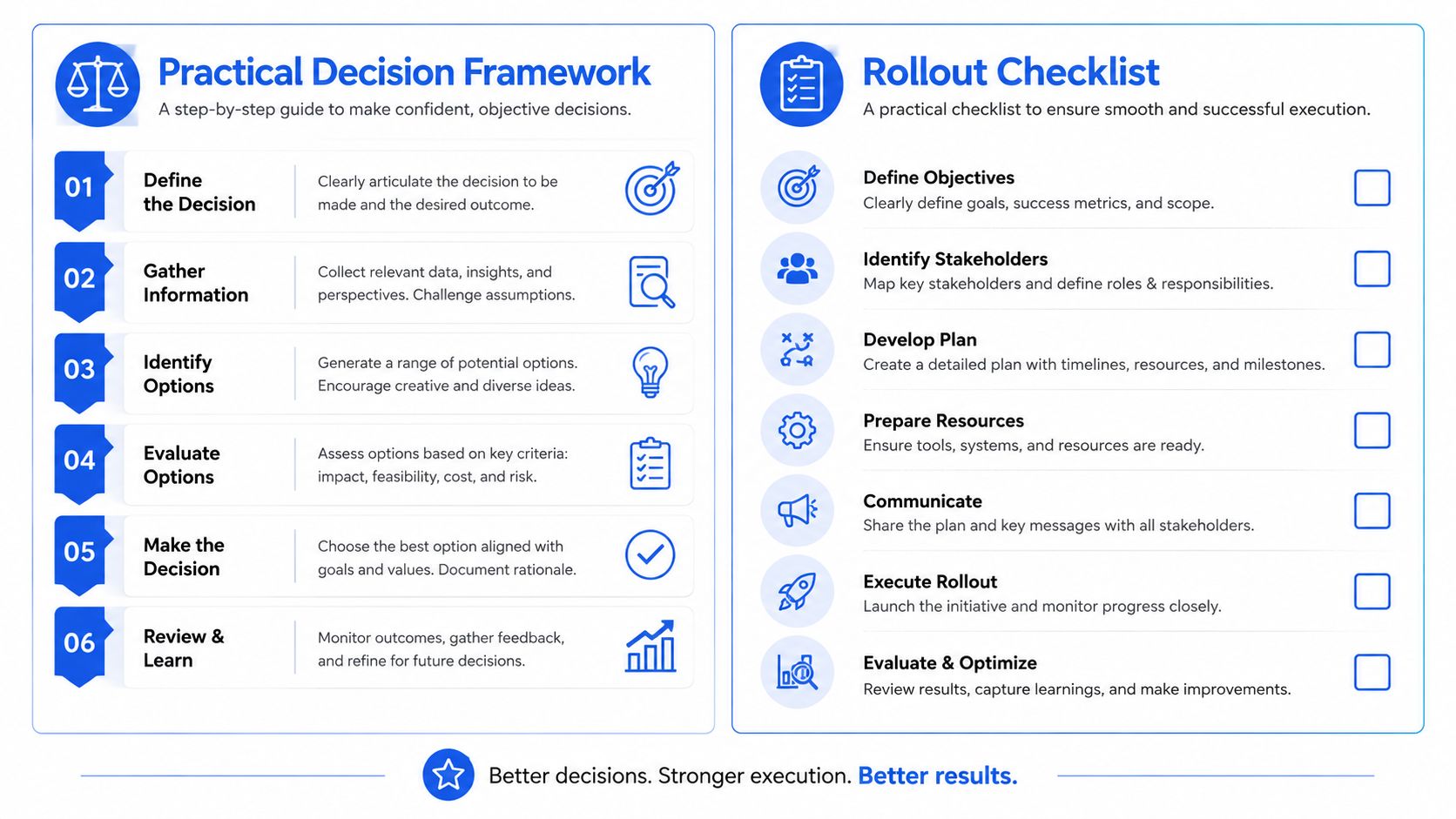
A simple owner-led evaluation
In week one, pull the last 30 inbound RFQs from email and score each candidate on intake parsing accuracy and response time. Don't use vendor sandbox data. Use your own ugly, real requests, the ones with missing quantities, messy PDFs, and finish notes buried in the body of the email.
In week two, run a paid pilot with one estimator handling five live RFQs per day through the system. Watch what happens to ownership, triage, and quote turnaround. If the software can't keep up with a normal day, it won't survive a busy one.
Rollout checklist
Map every intake channel: Connect shared inboxes, direct emails, and any portal-based requests.
Set routing rules: Sort by material, tolerance band, and job type.
Write acknowledgment templates: Make first responses fast and consistent.
Set SLAs: Use 15 minute ack and 4 hour qualified response targets.
Train estimators on handoff: Make the jump from RFQ to quote clean and repeatable.
Assign one owner: Keep one person responsible for the first 60 days.
If win rate doesn't move within one quarter of consistent use, the system is wrong, not the team. That's the hard truth most owners figure out too late.
If you want a quoting system that pulls RFQs from the inbox, tracks what's waiting, and helps your team move faster without losing the thread, visit Uptool and see how it handles the RFQ-to-quote workflow for CNC and fabrication shops. It's built for the kind of intake, triage, and follow-through that changes response speed and keeps good quotes from getting buried.
