The RFQ arrives in a shared inbox while a machine is already running a late job. You pull dimensions from a drawing, check material prices in a spreadsheet, estimate setup and cycle time from memory, then type the final number into QuickBooks. When the customer revises the drawing, the estimator updates one file, the scheduler checks another, and accounting may never see the change until an invoice goes out.
That workflow works until the shop has enough CNC work, sheet metal fabrication, outside finishing, and material movement to expose every disconnected handoff. QuickBooks manufacturing software can support the accounting and parts of the inventory process, but it won't replace a quoting engine, production scheduler, traveler system, or quality platform. The practical question is not whether QuickBooks is useful. It is where QuickBooks should stop, and which integration should carry the operational work.
Table of Contents
Why QuickBooks Alone Falls Short for Manufacturing Shops
Most small machine shops don't choose QuickBooks because they expect it to run a factory. They choose it because invoicing, bills, payroll, bank reconciliation, and financial reporting are familiar. Trouble starts when the team gradually asks the accounting file to manage RFQs, material allocation, routing, work orders, revisions, and shop-floor status.
A typical day makes the problem obvious. An owner searches email for the latest customer drawing. An estimator copies quantities and material requirements into a spreadsheet. A buyer records a material purchase separately, a lead adds progress notes to a traveler, and the bookkeeper later creates an invoice in QuickBooks. Each person may be doing sensible work, yet the business still has several versions of the same job.

The fragmentation is the bottleneck
QuickBooks is strong at recording financial events after they happen. Manufacturing teams need operational events captured while work is being quoted, purchased, scheduled, cut, machined, inspected, finished, and shipped. Those are different jobs.
The hidden cost appears in the handoffs:
RFQ control: Email threads can bury drawing revisions, quantities, and customer deadlines.
Estimate control: Spreadsheet assumptions may never reach the eventual order or invoice.
Production control: A spreadsheet schedule can show a planned date without showing whether material, tooling, programming, or inspection is ready.
Inventory control: Manual adjustments create opportunities for mismatches between physical stock and the accounting record.
Profitability control: Labor, scrap, outside processing, and rework can remain disconnected from the original estimate.
Practical rule: Keep QuickBooks responsible for financial truth, but give manufacturing software responsibility for the work that creates the financial result.
QuickBooks was introduced in 1992, and Intuit began offering industry-specific versions by 2003, including workflows, reports, and terminology suited to different trades and business types. That history helps explain why manufacturing became a distinct direction in the product line, but it doesn't turn an accounting platform into a complete shop operating system. Intuit's manufacturing overview describes the later inventory and build workflows that extend QuickBooks into manufacturing use cases.
The right integration connects the estimate to the order, the order to the traveler, the traveler to material and labor activity, and the completed work to the invoice. Without that chain, adding more spreadsheets usually adds more reconciliation rather than more control.
What QuickBooks Actually Offers for Manufacturing
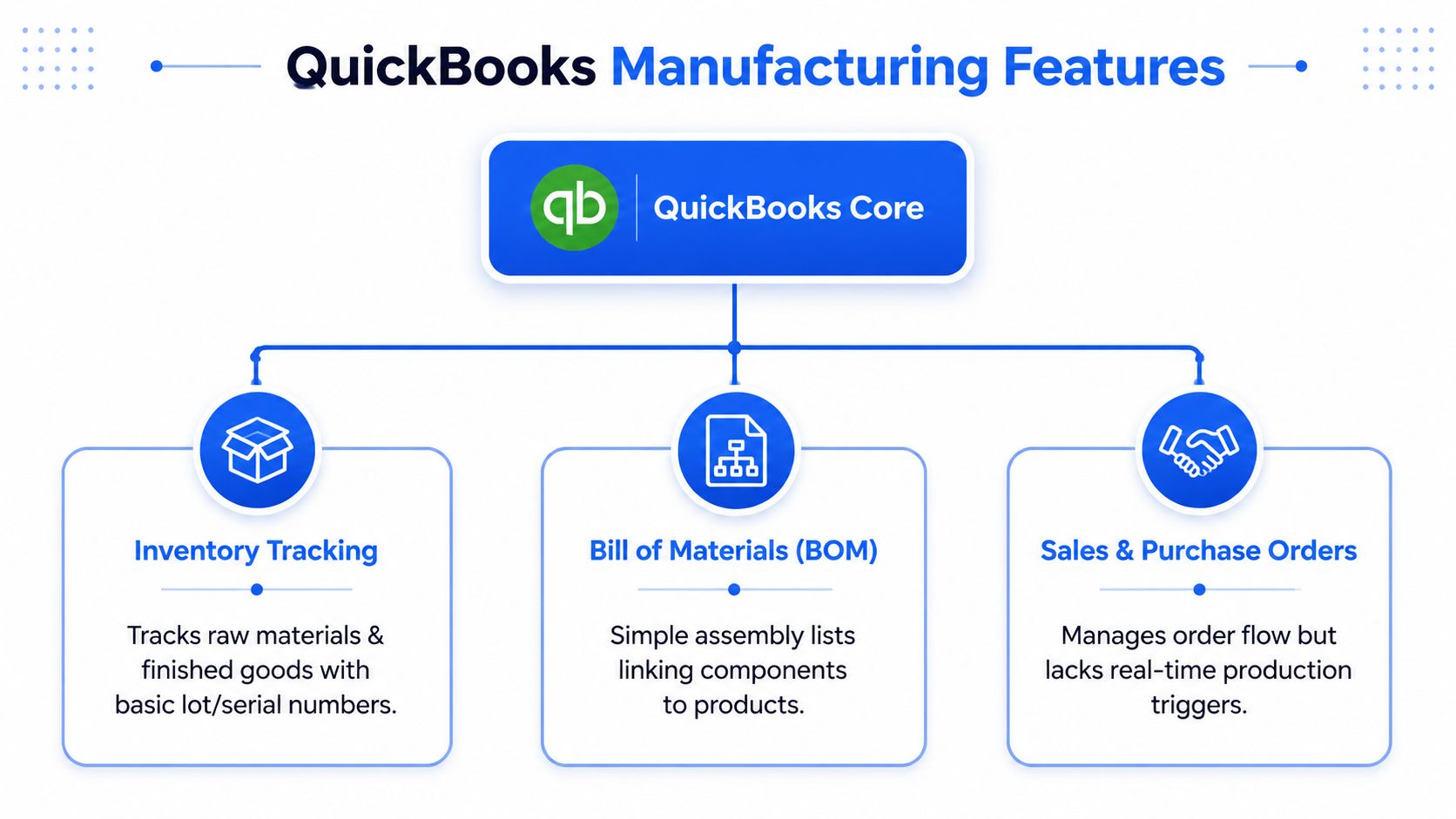
QuickBooks Enterprise can handle a meaningful slice of a straightforward manufacturing workflow. A shop can enable inventory tracking, define components, create a bill of materials, record builds, and review inventory reports. For a CNC shop assembling a simple finished item from known materials, that foundation may be adequate.
Its inventory tools also reach beyond a basic list of items. The manufacturing-focused Enterprise edition emphasizes barcode scanning for picking, receiving, and cycle counts, along with bin- or pallet-level tracking across warehouses and trucks. That matters when a fabricator needs to locate sheet, bar stock, hardware, or finished assemblies without relying entirely on memory.
Where the native workflow helps
QuickBooks can be useful for:
Basic inventory tracking: Record raw materials and finished goods, then review quantities and values.
Simple assemblies: Define components in a bill of materials and record a build.
Purchasing: Use purchase orders for components and subassemblies.
Financial reporting: Review inventory value, average cost, and related accounting activity.
Warehouse discipline: Use supported barcode and location workflows for receiving, picking, and counts.
The inventory reports are particularly useful for financial control. QuickBooks guidance points users toward Inventory Valuation Summary and Inventory Valuation Detail, which report quantity on hand, value, and average cost. Those reports can help an owner identify an inventory problem, but they don't explain whether a machine center has capacity, whether a revised drawing is approved, or whether a first-article inspection is waiting for a result. QuickBooks' inventory tracking guidance shows the intended build-and-report sequence.
Where the boundary becomes hard
The limitations become serious when production is multi-stage or revision-sensitive. Independent manufacturing analysis identifies gaps in native BOM depth, MRP, work-order management, and lot traceability. QuickBooks Desktop assemblies are also described as limited to simple single-level BOMs, without subassemblies, phantom BOMs, or engineering change orders. This review of QuickBooks manufacturing limitations explains why that distinction matters for more involved production.
QuickBooks Enterprise centers on automated builds and purchase orders, but it doesn't natively provide full production scheduling, engineering change management, or quality control. QuickBooks' manufacturing edition overview makes the feature boundary clear enough for a practical decision: use the core for inventory and accounting, then add specialist software for quoting, scheduling, execution, and inspection.
For shops comparing the accounting side of the workflow, a guide to best billing software can help separate invoicing requirements from manufacturing requirements. That separation prevents a billing feature from being mistaken for production control.
Comparing QuickBooks Integration Categories for Job Shops
A QuickBooks integration isn't a single product category. It may accelerate estimating, control job costs, coordinate production, or replace the need for several separate tools. Choosing the wrong category creates a polished version of the same fragmentation.
For CNC and sheet metal shops, start with the operational gap. If RFQs sit in email, a quoting platform may produce the fastest benefit. If quotes are acceptable but actual labor and material costs are unclear, a job-costing or shop-management system is more appropriate. If the business needs coordinated planning across locations, inventory, purchasing, production, quality, and fulfillment, an ERP deserves evaluation.
QuickBooks Integration Categories Compared
Category | Best For | RFQ Handling | CAD Integration | Shop Floor Visibility | Implementation Complexity |
|---|---|---|---|---|---|
Quoting and estimating platform | Shops losing time between RFQ and quote | Strong email intake, file organization, estimating workflow | Often strong for drawings, CAD files, and BOM extraction | Usually limited unless digital travelers or downstream tools are included | Low to moderate |
Job costing and shop management system | Shops needing work-order, labor, material, and job-margin control | Moderate, often dependent on manual or imported estimate data | Varies, with many systems relying on estimator input | Stronger work-order and status tracking than quoting-only tools | Moderate |
Full manufacturing ERP | Shops coordinating complex operations and financial data | Can support configured order and planning workflows | Varies by product and connected engineering tools | Broad visibility across inventory, purchasing, production, warehouse, and quality | High |
Match the category to the failure
A quoting tool should calculate setup, run time, material, outside operations, and finishing without forcing the estimator to retype every input. It may not schedule every machine or manage nonconformance records. That isn't necessarily a weakness. It can be the correct scope for a shop whose primary loss occurs before the quote is sent.
A shop-management system earns its place when supervisors need work orders, labor capture, material consumption, and job status in one operational view. It may offer less advanced CAD interpretation than a specialist quoting platform, so confirm how the estimator moves geometry and drawing data into the job.
An ERP offers the broadest process coverage, but implementation affects more than the software team. The business must standardize item records, routings, approvals, inventory practices, and reporting. Smaller shops can overbuy an ERP and underuse it if their real problem is still RFQ response time.
When reviewing vendors, practical QuickBooks integration tools for UK businesses provide useful context on integration patterns, but a CNC or fabrication shop still needs to test manufacturing workflows directly. Ask to see a real drawing, a material purchase, a revision, an outside finish, a partial shipment, and an invoice generated from the same job data.
Solving the Quoting Bottleneck in CNC and Sheet Metal Fab
Quoting fails when the estimator treats every part as material plus machine time. CNC and fabrication costs include fixed preparation work, supplier timing, secondary operations, inspection, handling, and the risk of missing a requirement hidden in a drawing.
Start by separating costs that scale with quantity from costs that don't. Programming, fixture installation, tool preparation, and first-article inspection are setup costs. A CNC cost breakdown places setup at about $800–$2,000 for a single-piece order, but about $4–$10 per part when spread across 200 pieces. The CNC setup cost breakdown from Matson Corporation supports the basic estimating lesson: the same setup must be allocated differently for one part and a production batch.

Build the estimate from the actual job
A reliable workflow should pull the following into one estimate:
Read the files first: Extract part quantities, material callouts, thickness, tolerances, finishes, and revision identifiers from customer emails, drawings, CAD models, and BOMs.
Separate setup from run work: Calculate programming, fixturing, tooling, first-article inspection, cutting, forming, machining, deburring, and handling as distinct operations.
Price material realistically: Use the required grade, size, yield, minimum purchase, and supplier availability rather than a generic material line.
Add outside processing: Include heat treating, plating, powder coating, anodizing, laser marking, or other finishing steps when the job requires them.
Set a defensible lead time: Treat material, queue, run, secondary operations, and buffer as separate blocks.
Lead time deserves its own check. One practical manufacturing rule says a quoted lead time shouldn't be shorter than material lead time plus one day. For a certified bar that must be ordered, the example is supplier time of 5 days plus 1 receiving day, or 6 working days. This lead-time estimation guide shows why quoting capacity without checking material availability produces promises the floor can't keep.
For a focused explanation of the estimating problems specific to fabrication, see sheet metal fabrication quoting. The key is not merely producing a faster number. The system must preserve the assumptions so production and accounting know what the number included.
A quoting integration can then pass an approved estimate into an order or invoice workflow instead of making accounting re-enter the job. The estimator still reviews the result, but the business stops treating the spreadsheet as an invisible database.
Connecting Front-Office Quoting to Back-Office Accounting
The quote-to-cash handoff is where disconnected systems become expensive. An estimator may quote one revision, a buyer may purchase against another, and accounting may invoice from a short description that doesn't show the agreed scope. Customers experience the result as a billing dispute, even though the root cause began much earlier.
A connected workflow assigns one job identity from the first RFQ onward. The email record, drawing revision, estimate, customer approval, purchase requirements, traveler, and invoice should point to the same controlled record. That doesn't mean every employee needs access to every feature. It means each role works from data that has a clear origin.
A practical handoff
The sequence should look like this:
Intake: Capture the RFQ, attachments, requested quantity, customer deadline, and communication history.
Estimate: Record material, setup, machining or fabrication operations, finishing, outside services, markup, and assumptions.
Approval: Lock the accepted revision and commercial terms.
Execution: Generate a traveler or work instruction with the specifications the floor needs.
Billing: Transfer the approved order and completed quantities into QuickBooks without retyping the commercial data.
Revision history matters just as much as automation. If a customer changes hole sizes, material, coating, or quantity, the estimator needs to see what changed and what the previous quote included. Otherwise, a faster workflow can make the wrong information travel faster.
Email synchronization also has a practical role. Customer questions about tolerance, packaging, or finishing often arrive after the initial quote. Keeping those conversations attached to the job gives the estimator, project lead, and bookkeeper a shared context instead of leaving critical decisions in a personal inbox.
Make profitability visible at the job level
QuickBooks can record the financial result, but the manufacturing system must capture the operational cause. If setup overran, material yield was poor, or powder coating cost more than expected, the owner needs to compare those facts with the original estimate. The resulting review is more useful than a company-wide margin report because it shows which assumptions need correction.
Guidance on manufacturing quoting software is useful when mapping this handoff. Look for estimate-to-order mapping, QuickBooks synchronization, revision control, digital travelers, and clear ownership of master data. A sync that only exports a customer name and invoice total won't solve the operational gap.
Choosing the Right Integration for Your Shop Size and Stage
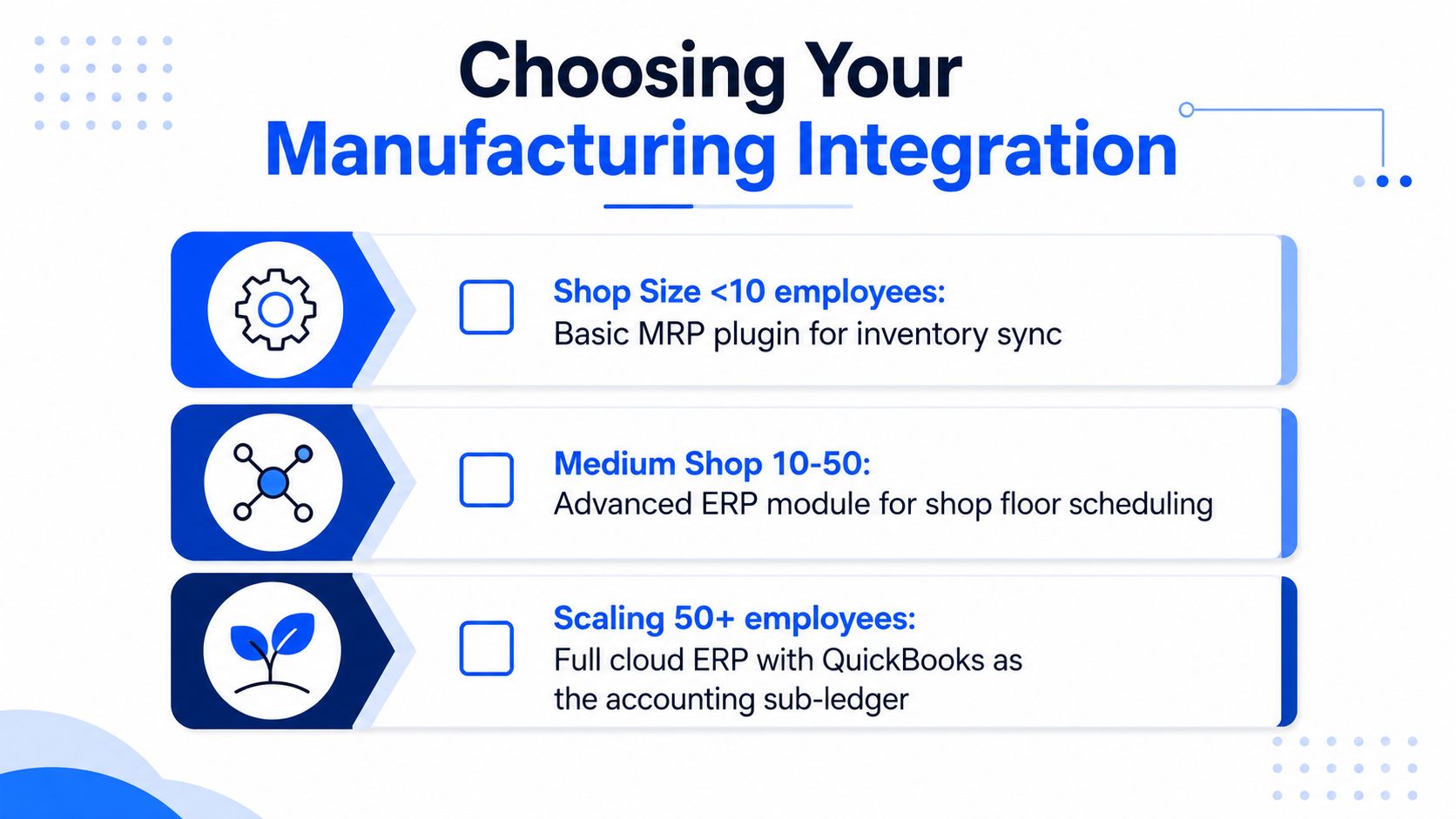
The right QuickBooks manufacturing software depends less on headcount alone than on workflow complexity. A small shop with simple repeat work can need better quoting long before it needs a full ERP. A larger operation may already have enough disconnected tools that another plug-in only adds another reconciliation point.
Start with the questions that expose the constraint:
RFQ volume: How many requests arrive in a typical week, and how many wait because nobody has time to review drawings?
Response pressure: Do customers choose another supplier because the quote arrives late?
Cost confidence: Can the team compare estimated material, labor, setup, and outside processing with actual job results?
Inventory accuracy: Does the physical stock agree with the system when a buyer, estimator, or scheduler needs an answer?
Execution complexity: Are multiple machines, subcontractors, finishing steps, revisions, or inspection records involved?
Growth direction: Will the next stage add customers and repeat work, or add locations, product variation, traceability, and planning requirements?
Choose the smallest system that closes the largest gap
For a small CNC or fabrication shop, a dedicated quoting platform with QuickBooks synchronization can be the sensible first move. It addresses RFQ intake, CAD and drawing review, setup allocation, material and finishing calculations, and quote handoff without forcing the company to replace functioning accounting processes.
A shop running several machine types or complex assemblies needs more production control. Job costing and shop-management software can connect work orders to labor, material consumption, outside processing, and status updates. The implementation is heavier, but it gives supervisors information a quoting-only tool generally won't provide.
A growing operation with multiple sites, extensive traceability, or complex purchasing and production planning may need an ERP. At that point, QuickBooks may remain useful as a temporary financial component, but the business should assess whether it is still the right system of record.
Decision test: If the main pain is slow quotes, fix quoting first. If the main pain is unknown job cost, fix job tracking. If the main pain is conflicting data across the whole operation, evaluate an ERP.
A practical machine shop software stack can help owners map the current tools before buying another one. Document where each piece of information starts, who edits it, and where it ends. The gaps will show whether an integration or a migration is the more disciplined choice.
When to Outgrow QuickBooks Entirely
Adding QuickBooks Enterprise or another plug-in won't solve every manufacturing problem. Integrations extend a platform when the boundary is clear. They struggle when the business needs one operational model for multi-level products, production planning, quality, traceability, inventory, and financial control.
The warning signs are concrete. Your shop may be ready to move beyond QuickBooks when:
Subassemblies drive production: The product requires multi-level BOMs, substitutions, phantom components, or controlled engineering changes.
Traceability is mandatory: Customers or regulators require lot history, material certificates, inspection records, or a reliable chain from receipt through shipment.
Multiple locations operate together: Inventory, purchasing, production, and fulfillment need synchronized visibility across sites, warehouses, or trucks.
The floor needs live data: Operators and supervisors need mobile collection for labor, quantities, scrap, quality checks, and job status.
Planning depends on workarounds: Schedulers maintain spreadsheets because the accounting system doesn't provide native production scheduling or capacity coordination.
Reconciliation consumes management time: Finance and operations repeatedly compare spreadsheets, inventory records, purchase orders, and job reports to decide which number is correct.
Independent manufacturing commentary also identifies missing MRP, demand forecasting, mobile warehouse support, and traceability as reasons manufacturers continue to outgrow QuickBooks, particularly in regulated or higher-volume environments. This analysis of manufacturers outgrowing QuickBooks focuses on the operational consequences rather than treating accounting as the only issue.
The cost of staying isn't limited to a subscription. It includes double entry, delayed quote revisions, incorrect order promises, manual inventory reconciliation, disconnected quality records, and time spent explaining why two systems disagree. For a broader view of ERP system integration benefits, focus on shared data, process ownership, and the reduction of duplicated work rather than on a feature checklist.
QuickBooks can remain a sensible financial hub when a specialist quoting or shop-management system owns manufacturing execution. But once the business needs a single system across production, inventory, purchasing, quality, and accounting, migrating to a true manufacturing ERP may create less risk than continuing to bolt tools onto a fragmented workflow.
Uptool helps CNC machine and fabrication shops organize RFQs, analyze CAD files, drawings, and BOMs, build estimates around materials, machining, sheet metal work, and finishing, and connect approved quotes with QuickBooks accounting workflows. If disconnected quoting and billing are slowing your shop, visit Uptool to see whether its quoting and QuickBooks integration fits your current process.
