If your Monday starts with a flooded inbox, three STEP files named “quote_final_v7,” a scanned print with handwriting in the margin, and a spreadsheet that nobody trusts anymore, you're already living the problem manufacturing quoting software is meant to solve. The issue isn't that your shop lacks effort. It's that manual quoting turns every RFQ into a scavenger hunt, and the best jobs often go to the shop that answers first with a clean, credible number.
That's why this category matters now for small CNC and fab shops. The market is expanding, with independent research placing manufacturing quoting and estimating software at USD 2.0359 billion in 2024 and projecting USD 4.0 billion by 2035, while another estimate puts it at USD 2.690 billion in 2025 and USD 5.2 billion by 2035 (Wise Guy Reports). Even broader quote-management research says manufacturing makes up 21.8% of demand in that category, and integrated systems can cut quote errors from 6.8% to 0.3%, improve delivery promise accuracy to 97%, and reduce quote-to-order cycle time by 34% (Dataintelo). Those numbers matter because they describe the exact pain job shops feel every day, slow response, sloppy handoffs, and margin leaks that come from re-keying the same information twice.
Table of Contents
What Manufacturing Quoting Software Actually Does
A shop owner doesn't usually wake up thinking about software categories. They wake up to RFQs scattered across Outlook, a customer asking for a revised quote by noon, and an estimator trying to compare an old job against a new one with different material, finish, and tolerance requirements. That's the primary use case for manufacturing quoting software; it pulls those inputs into one place, turns them into a structured estimate, and sends back a professional quote without forcing someone to stitch everything together by hand.

Where it sits in the shop
This software sits between the inbox, engineering, estimating, and the systems that run the business. It replaces the messy mix of email threads, spreadsheets, file folders, and gut feel that too many shops still rely on. If you've ever had one person know where the “real” numbers live, you already know why that's a problem.
This category typically encompasses RFQ intake, drawing and CAD parsing, BOM handling, cost rollups, quote generation, and recordkeeping. In shop terms, this means one estimator can go from a customer email to a priced quote without copying data into five different files. For a broader view of how these tools connect to operational processes, the story of MOM at Pebb's manufacturing operations management guide is worth a look because it shows how quoting lives inside the larger production workflow.
What matters most is not the label on the product, it's whether the software replaces manual triage with a system of record. A good platform should track who sent the RFQ, what files came with it, what version is active, and what assumptions were used in the quote. That history is what protects you when a customer comes back three weeks later and says the scope changed.
It should also connect to the rest of the stack instead of becoming another island. If you want a practical map of where quoting fits alongside the rest of shop systems, this machine shop software stack overview helps show the role it plays without turning it into enterprise theater.
Practical rule: If a quoting tool can't show you what came in, what was calculated, and what went out, it isn't replacing chaos, it's just hiding it.
The Core Capabilities Worth Paying For
The first capability that matters is RFQ ingestion from connected email. If your inbox is the front door to the business, the software should automatically detect incoming RFQs, route them, and keep them visible in a command center instead of burying them under newsletters and vendor notices. That's basic hygiene, not a luxury.
Parsing the inputs that usually slow shops down
From there, the software needs to handle 3D CAD, 2D drawings, and BOM files without requiring your estimator to do all the interpreting. The value is simple: structured extraction consistently outperforms manual takeoff because the geometry, part notes, and bill of materials aren't trapped in someone's head. For estimating teams operating in a job-shop environment, native multi-level BOM handling with live cost rollups is essential, because nested assemblies and quantity breaks quickly disrupt spreadsheet logic (WorksBuddy).
You also want AI estimating that pulls geometry and key part inputs into a costing model, not AI that pretends to replace judgement. One vendor says its CAD upload workflow performs a 20-point analysis and applies hundreds of pricing parameters, while another source says AI-powered RFQ-to-quote automation can cover up to 90% of the workflow (DigiFabster). That's the right mental model, automation handles the extraction and repeatable math, your team still owns the final price.
The features that keep it useful after day one
A quoting system only sticks if it also gives you the boring tools that keep the process sane. That means material and finishing databases, libraries of operations and calculators configured for machine and fab work, reusable templates, configurable markups and lead times, revision history, and digital travelers that carry the quote downstream. It also means real-time email sync with CRM-style tracking and QuickBooks integration so accounting isn't retyping the same order when a quote turns into a job.
For shops that want the underlying costing logic explained in plain language, job order costing is a useful reference because it connects estimate building to job-level cost control. That's a key test, whether the software helps you quote in a way that can be measured later against what the job consumed.
Bottom line: The best quoting platform isn't a pile of features. It's one workflow that turns inbox noise, file chaos, and cost math into a quote your shop can stand behind.
Business Benefits That Show Up on the P&L
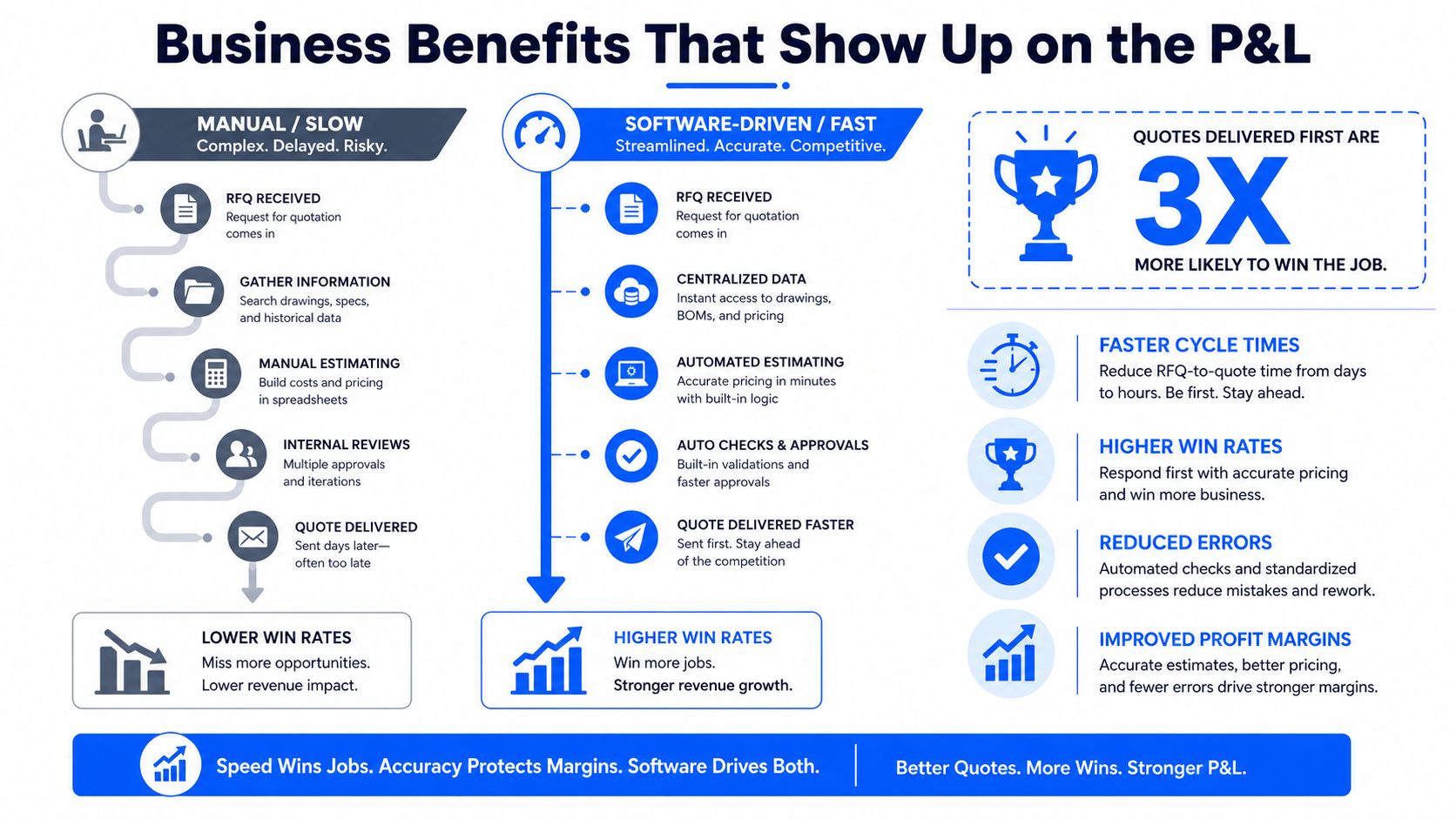
A shop owner feels quoting pain in one place first, lost work. The customer sends an RFQ, the clock starts, and every hour spent hunting files, fixing spreadsheets, or clarifying drawings gives a competitor more time to win the job. Manufacturing quoting software pays for itself by turning that scramble into a quote your team can send while the buyer is still comparing options.
Faster quotes protect revenue
The first P&L gain is simple, you stop donating opportunities to the shop that answers first. A structured quoting system cuts the RFQ-to-quote loop, so you have a realistic shot at winning jobs where the buyer is lining up multiple vendors side by side. Why slow quoting is costing U.S. machine shops work makes the owner-side case plainly, slow quoting does not just slow the office down, it sends work to someone else.
The same Dataintelo report notes that integrated systems reduce quote-to-order cycle time by 34% and improve delivery promise accuracy to 97% (Dataintelo). That is the point, faster response without guessing at dates your floor cannot support.
Buyers do not reward the most exhausted estimator. They reward the shop that looks organized, responds quickly, and does not make them babysit the quote.
Accuracy and traceability protect margin
Manual spreadsheets usually break in two places, bad assumptions and bad revision control. Structured BOM handling reduces both problems because cost rollups come from the product structure, not from whatever got copied into a tab last week. The same Dataintelo report notes that integrated manufacturing quoting systems reduce quote errors from 6.8% to 0.3%. That is the kind of correction that protects margin on jobs with a lot of line items and revision churn.
Traceability matters just as much as speed. If a quote gets revised three times and nobody can tell which numbers changed, the shop is gambling with gross margin. Digital revision history gives owners something spreadsheets do not, a defensible audit trail when a customer, estimator, or production lead asks why the price moved.
The front-office and back-office payoff shows up in day-to-day work too. When a quote turns into a sales order without re-keying, you cut handoff errors and shorten the gap between winning work and releasing it to production. That is a strong business case for manufacturing quoting software, offering less friction, fewer mistakes, and a cleaner path from inbox to booked job.
How to Choose the Right Platform for Your Shop
Ignore vendor demos that sound like they were written for an enterprise software conference. A small or mid-sized shop needs a platform that can live in a practical setting, where one estimator wears four hats and the quoting process has to work on a Tuesday with three urgent RFQs and one customer who keeps sending “final” revisions. The right filter is whether the tool makes your current workflow more reliable without turning into a new admin job.
What to demand in the demo
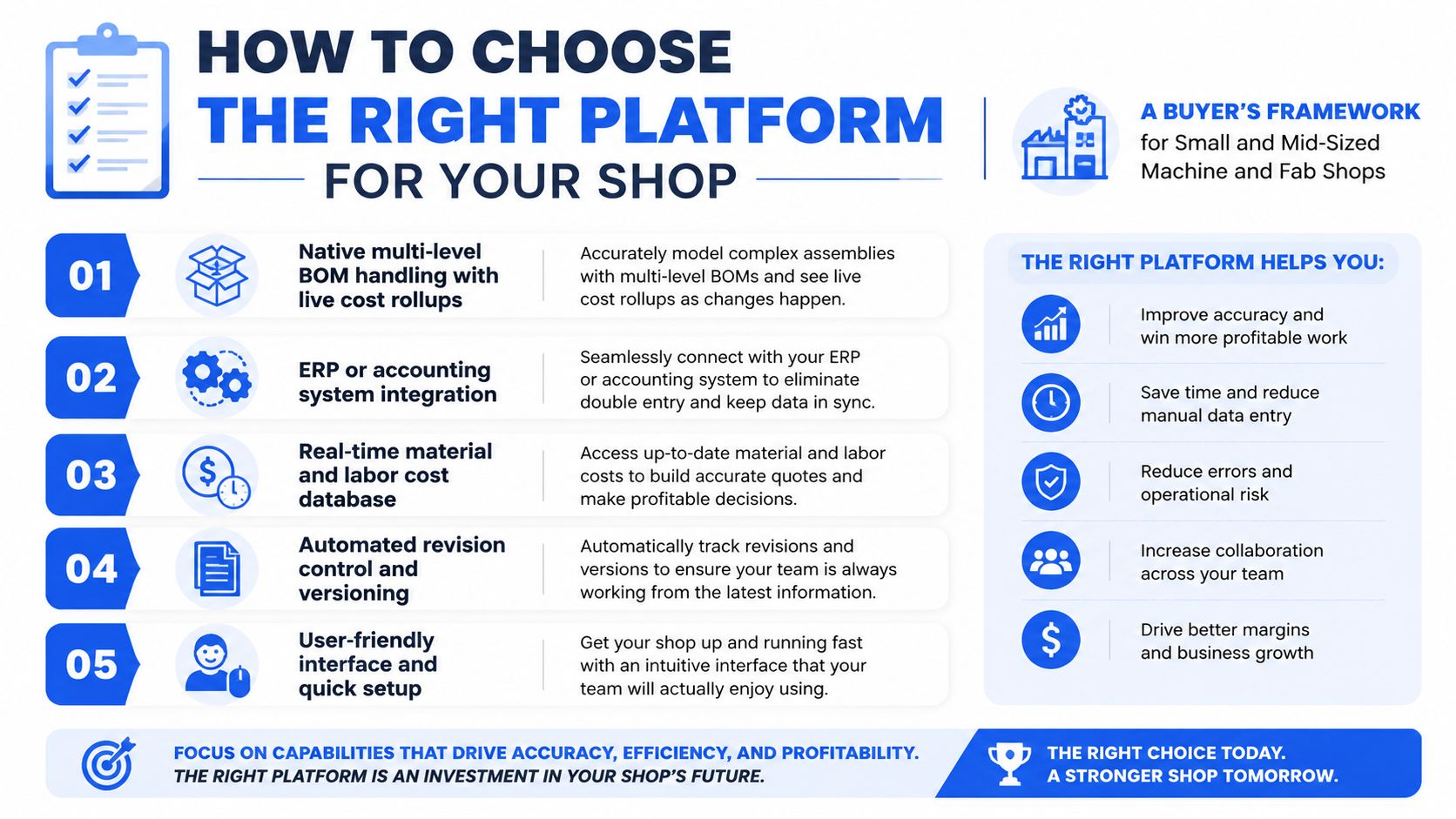
Start with the basics that affect quote quality. The platform should support native multi-level BOM handling with live cost rollups, ERP or accounting integration that writes confirmed quotes back as sales orders, and automation for CAD and drawings that extracts geometry instead of forcing manual takeoffs. If it can't do those three things cleanly, don't let the sales pitch distract you.
Then test the fit for your shop, not the vendor's roadmap. Ask how fast setup is, whether you can customize calculators for your own machines and finishing steps, whether it works with your existing email provider, and whether it can aggregate multiple inboxes into one queue. If you run a smaller shop, month-to-month subscription flexibility matters because you shouldn't have to bet the year on a tool you haven't proven in production.
Use a printed checklist
Bring this to the demo and fill it out in real time.
Inbox intake: Can it pull RFQs from your current email accounts without forcing a new email system?
Revision control: Can it preserve quote versions so you can review margin changes later?
Human oversight: Can an estimator review, edit, and approve AI-extracted data side by side?
Shop calculators: Can you configure your own markups, lead times, and operation rules?
Back-office flow: Can the confirmed quote move into accounting without retyping?
If you handle regulated work, ask about ITAR-aware pricing and data handling up front. Don't bury that question until after procurement has already fallen in love with the interface. The right platform should fit your compliance reality without making the estimator become the compliance officer.
Uptool, Inc. is one option in this segment, and it's built around AI-assisted quoting for CNC and fabrication shops. It parses emails, CAD models, drawings, and BOMs, then organizes the estimate and quote workflow in one system, which is exactly the kind of practical fit a shop should be looking for when comparing tools.
Rolling It Out and Measuring Real Results
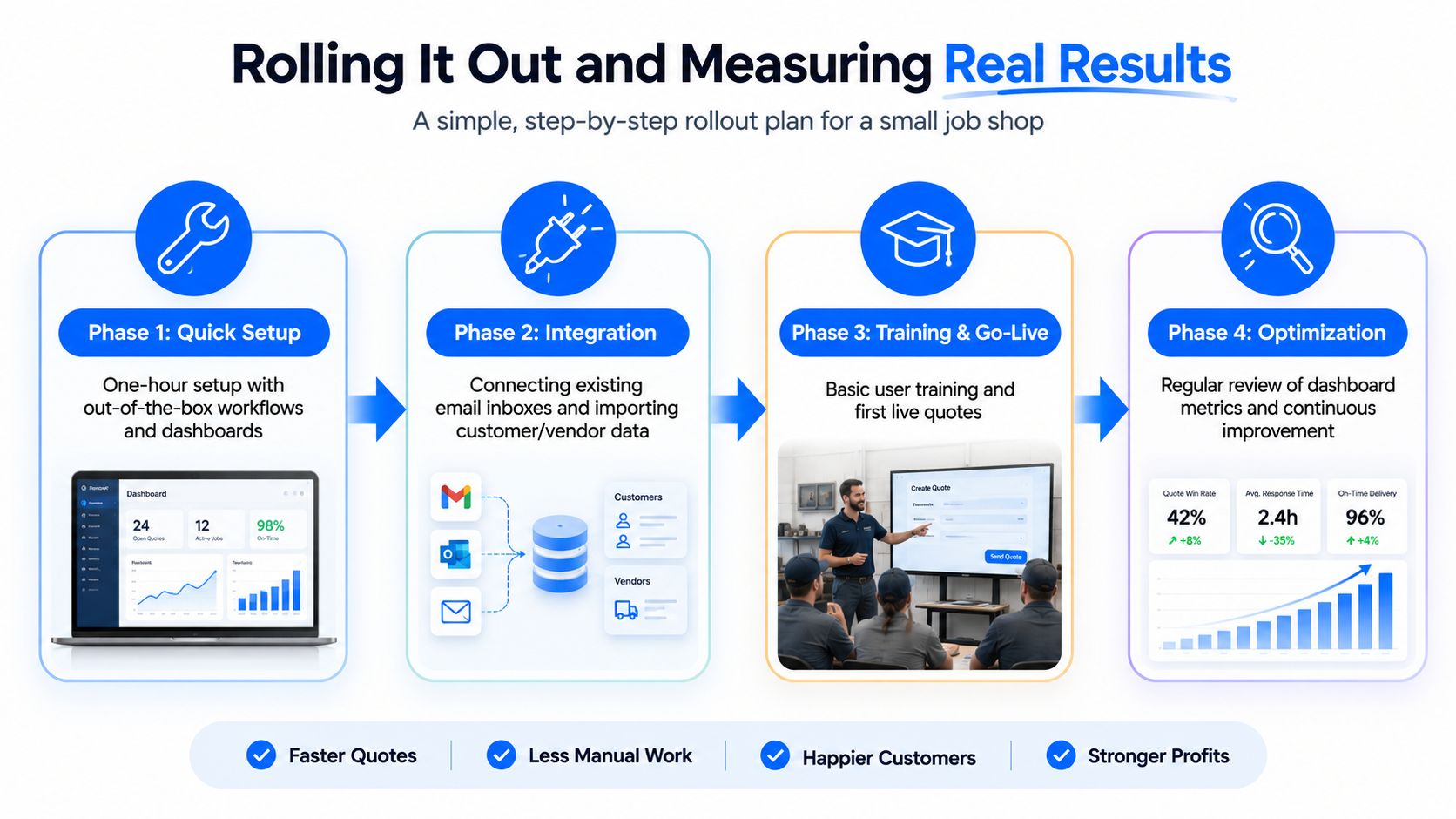
The cleanest rollout is the one that doesn't disrupt the floor. Start by connecting the inboxes where RFQs already land, then import your pricing calculators, lead times, markups, and any historical part data you trust. If a platform says setup takes about an hour with out-of-the-box workflows and dashboards, make the vendor prove it on your own data before you commit to a wider rollout.
Roll out in parallel, not in a vacuum
Keep the old process alive for the first live RFQs. That gives you a side-by-side comparison without forcing the team to trust a new system blindly. It also gives estimators room to see where the software is helping, where it needs correction, and which parts still need human judgement.
The point isn't to remove the estimator. The point is to remove the repetitive hunting, copying, and re-checking that burns time without adding value. Uptool's workflow, for example, is designed around roughly 90% automation coverage of RFQ to quote work on one platform, which is the right target if your goal is faster quoting without turning the shop into a black box.
Simple rule: automate the extraction and the math, keep humans on exceptions, pricing judgment, and final approval.
Track the metrics that matter
From week one, watch time-to-quote, win rate, and estimate accuracy. Time-to-quote tells you whether the system is making the estimator faster. Win rate tells you whether speed and professionalism are changing customer behavior. Estimate accuracy, measured as quoted versus actual cost on finished jobs, tells you whether the model is protecting margin or just making guesses faster.
Those three numbers only mean something together. A faster process with weaker estimates is a bad trade, and a highly accurate process that arrives too late is still lost revenue. Valence Precision's quoting workflow with Uptool is a useful example of how a shop can use the system to compress quoting work while keeping visibility on what changed and why.
Common Objections and How to Push Back on Them
“Our spreadsheets work fine” usually means nobody has counted the time lost to hidden rework. Spreadsheets miss RFQs that sit in inboxes, they miss revision drift, and they do nothing to keep markup logic consistent from one estimator to the next. They also depend on one or two people knowing where every formula lives, which is a brittle way to run quoting in a shop that wants to grow.
The AI objection is usually framed badly. Estimators do not need software that pretends to be a senior estimator, they need a system that pulls geometry from CAD, reads drawings, and organizes the RFQ data so a human can price it with judgment. In a job shop, good AI serves as an assistant rather than a replacement, and side-by-side human review should stay in the process.
The cost objection deserves a sharper answer. Enterprise CPQ often brings implementation drag and IT overhead that make sense for a large manufacturer and feel ridiculous in a 10-person shop. Small shops need practical quoting software that replaces manual workflows without creating a new internal project, and that is exactly where the market still leaves too many owners stuck.
Vendor lock-in is real, but it should not be the first thing you worry about. Pay attention to whether the platform keeps clean quote history, exports usable records, and preserves the assumptions behind each estimate. That gives you portability with context, which is far more useful than a generic data dump after the fact.
Where to Go From Here and What to Watch Next
Start with your own numbers. For two weeks, track every RFQ that comes in, every quote that goes out, how long each one takes, and which ones win. That baseline gives you something concrete to compare against when vendors start using vague language about productivity and transformation.
Then run a tight shortlist, not a broad beauty contest. Use the checklist from the earlier section, compare two vendors against your actual workflow, and make them show how they handle inbox intake, CAD or BOM parsing, revisions, and quote-to-order handoff. If a tool can't survive a real demo with your files and your process, it won't survive real production pressure.
The next wave of AI-assisted quoting is headed toward deeper manufacturability checks, tighter scheduling links, and better feedback from actual job cost back into the quote model. That's where this category is going, not just faster document generation, but better operational decisions before the job ever hits the floor.
The core takeaway is simple. In a market where buyers expect fast, accurate, professional quotes, the right manufacturing quoting software gives estimators the time and data to win the right work at the right margin. Uptool, Inc. builds AI-powered quoting software for CNC machine and fabrication shops, and if your current process still lives in email threads and spreadsheets, it's worth seeing how that workflow looks in a single platform. Visit Uptool, Inc. and compare it against the way your shop quotes today.