Three RFQs arrive before the first machine warms up. One needs several CNC operations and tight tolerances. Another is a small sheet metal batch with bending, deburring, and powder coating. The third customer has attached a revised drawing to an email thread your estimator hasn't opened yet.
By the time the quotes are ready, the customers may already be comparing a competitor's response. That's the practical reason AI estimating software matters to a machine or fabrication shop. It isn't about replacing the person who understands your fixtures, tooling, material behavior, and customers. It's about removing repetitive work while keeping pricing decisions visible, reviewable, and under control.
The strongest case for adoption is speed backed by governance. Industry reporting cited contractors using AI-assisted estimating tools cutting bid preparation time from an average of 34 hours per project to about 14 hours, roughly a 60% reduction, while AI-powered cost models predicted final project costs within 4.2% accuracy, compared with 11.8% for traditional methods. Those figures come from a 2026 industry report on AI in heavy civil estimating, and your shop's results will depend on data quality, part mix, and estimator review.
Table of Contents
Quote Revisions, Approvals, and Keeping Estimators in Control
A 90-Day Plan to Pilot AI Estimating Without Disrupting Production
Why Your Shop Is Losing Quotes You Should Be Winning
Monday morning brings three RFQs before the first machine warms up. One CNC part needs multiple setups and tight tolerances. A sheet metal order requires a production run, bending, deburring, and powder coating. The third request includes a revised drawing buried in an email thread.
By Wednesday, two customers have awarded the work elsewhere. The stated objection may be price, but the deeper failure is often response time and quote clarity. Buyers cannot assess your machining or fabrication capability if the quote arrives after the decision.
Spreadsheet quoting creates that delay by making experienced estimators repeat low-value work:
RFQ sorting: Open emails, locate attachments, identify the current revision, and transfer requirements into a working file.
Drawing review: Check dimensions, material, tolerances, hole counts, bends, and finishing requirements manually.
Cost buildup: Enter setup, cycle time, material yield, tooling, labor, inspection, and margin across disconnected sheets.
Quote cleanup: Move the final figure into an email or template, often without preserving the assumptions behind it.
That last gap is bigger than a speed problem. Without clear revision control, an estimator can price the wrong drawing, apply an outdated material rate, or change a setup assumption without leaving an audit trail. AI estimating software should create a controlled draft, retain the source requirements, and make each revision visible before anyone sends the quote.
AI can prepare much of the groundwork by reading RFQ content, extracting details from CAD and drawings, and organizing a draft cost model. Your estimator still decides whether a thin-wall part needs a different fixture, whether an alloy will increase tooling wear, whether material yield makes the job viable, and whether tight tolerances require added inspection.
The recommendation is straightforward: use AI to shorten the path to a defensible quote, then require human approval for the cost drivers and revision that protect margin.
Shop-floor rule: AI prepares the quote. The estimator owns the assumptions.
Construction and manufacturing workflows differ, yet both face pressure to turn technical inputs into repeatable prices before an opportunity expires. The construction estimating software market was cited at $3.07 billion in 2026 and projected to grow at a 12.66% CAGR, according to the industry report covering AI's role in estimating. For a CNC or fabrication shop, the practical lesson is to govern revisions and cost logic, not just send quotes faster.
What AI Estimating Software Actually Does in a Shop
AI estimating software isn't a chatbot that guesses what a part should cost. In a CNC or fabrication shop, it performs a sequence of practical jobs, and each stage affects the quality of the final quote.
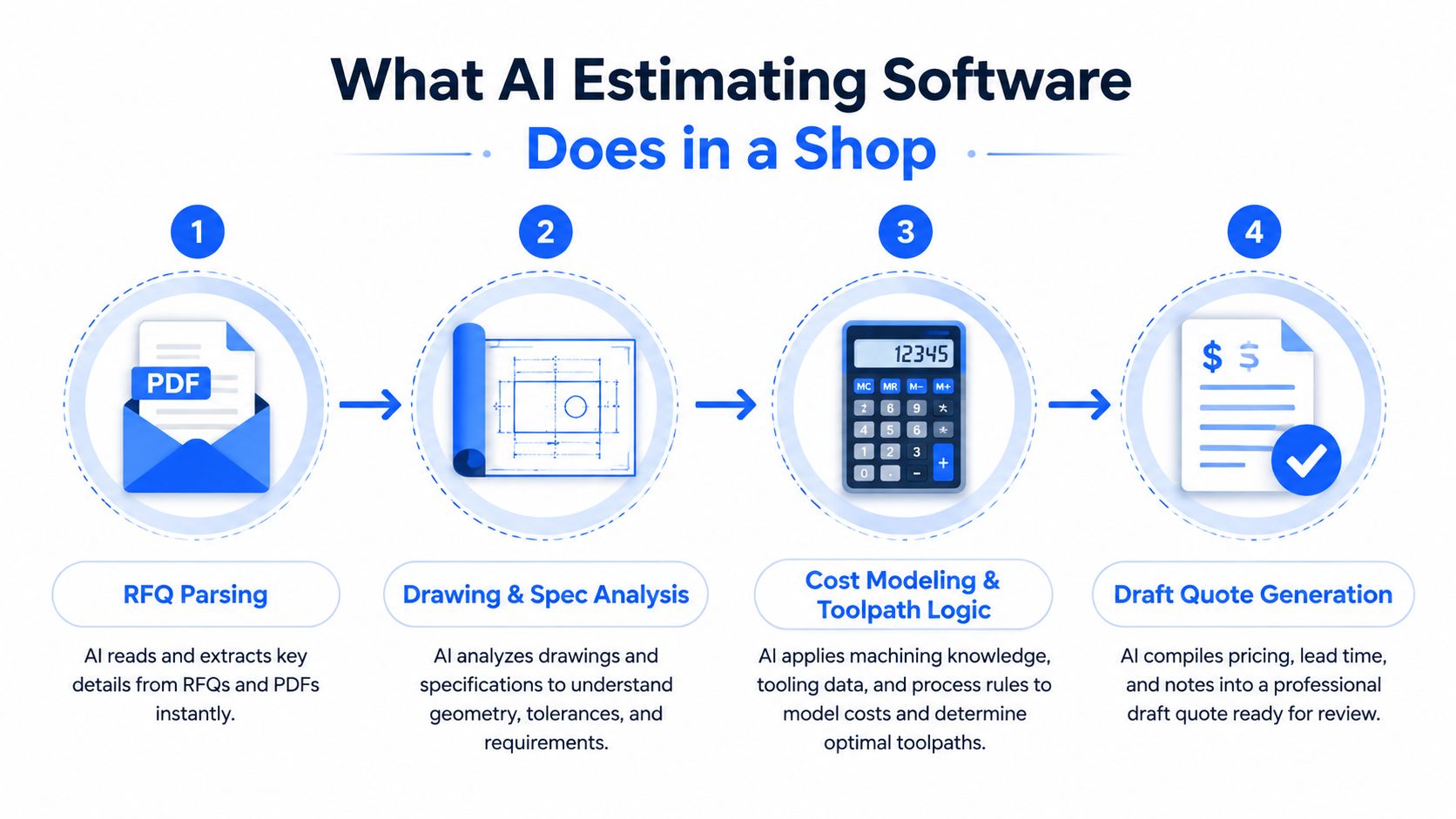
RFQ parsing
The system starts with the request itself. It reads email messages, PDFs, customer portal content, and attachments, then structures details such as part description, quantity, material, tolerances, finish, delivery terms, and requested documentation.
That matters because an RFQ isn't just a drawing. A note buried in an email can change the price more than a visible feature in the model. A reliable system should connect the request, attachments, and reply thread instead of treating each file as an isolated task.
CAD and BOM extraction
Next, the software analyzes available design information. Depending on the platform, that can include STEP, IGES, native CAD files, 2D drawings, and BOMs. It looks for features such as pockets, holes, taps, bends, weldments, quantities, and material callouts, then maps those findings to your routing and operation templates.
Tools differ sharply. A platform that only counts geometry may save drawing review time but still leave your estimator to build the manufacturing route. A deeper system links geometry to operations, material rules, and finishing requirements.
Cost model generation
The software applies your shop's rules to the extracted inputs. The model can include machine rates, labor burden, setup time, cycle time, secondary operations, material yield, tooling, inspection, overhead, and margin.
The output should be a draft with line-item detail, not an unexplained total. If the system can't show why it assigned a setup, material quantity, or finishing charge, your estimator can't properly challenge the result.
Human review and release
The estimator reviews assumptions, adjusts cycle time or setup, adds exclusions, and approves the quote. This human-in-the-loop design is consistent with the practical role described in Wistec productivity insights, where automation supports work rather than removing accountability.
For a focused look at the workflow, see this guide to CNC estimating software. The important question isn't whether a vendor uses the word AI. Ask whether it produces a traceable draft that your estimator can correct and release confidently.
How the Major AI Estimating Approaches Stack Up
The right system depends on how much of your current quoting process you want to replace. A lightweight helper can be useful if your cost model is already disciplined. A full platform makes more sense when RFQs, CAD files, operations, approvals, and accounting are all connected.
Criterion | Lightweight AI Helper | Mid-Tier Platform | Full Estimating Platform |
|---|---|---|---|
RFQ intake | Helps organize copied information | Reads common emails and attachments | Connects inboxes, threads, attachments, and RFQ status |
CAD ingestion | Usually limited to basic files or manual input | Extracts features from STEP, IGES, or selected CAD formats | Supports broader CAD, drawings, BOMs, feature logic, and routing |
Cost model | Suggests values or assists spreadsheet entry | Builds a draft model for estimator refinement | Applies libraries, operations, rates, margin rules, and revisions |
Human controls | Manual edits outside the tool | Editable assumptions and review fields | Override trails, approval gates, reviewer notes, and audit history |
Accounting integration | Export or re-keying | Basic data transfer | Direct handoff to accounting and downstream workflows |
Revision handling | Often manual file naming | Tracks selected quote versions | Links drawings, assumptions, approvals, and final quote versions |
Lightweight helpers
These tools reduce line entry and may suggest cycle times from historical jobs. They're a sensible starting point for a shop that already has clean spreadsheets and wants assistance without changing the entire process.
The limitation is obvious. Your estimator still builds much of the cost model, manages revision files, and moves information between systems. You get assisted quoting, not end-to-end control.
Mid-tier platforms
A mid-tier platform adds CAD feature extraction, BOM parsing, and a rough cost framework. This suits a mixed CNC and sheet metal shop with steady RFQ volume, especially when the estimator wants automation but still expects to make frequent manufacturing decisions.
The buying test is whether the system exposes assumptions cleanly. If your estimator can change a setup, material yield, or finishing operation and see the effect immediately, the platform is doing useful work.
Full estimating platforms
A full platform connects intake, CAD analysis, cost libraries, routing, approvals, and ERP or accounting handoff. It should produce a near-final quote while leaving margin decisions and exception handling with your team.
Don't buy this tier just because the demo looks impressive. If your shop lacks consistent historical costs or nobody owns the operation library, you'll pay for automation that still needs manual repair. Choose the tier that matches your data discipline, not the vendor's branding.
The Real Cost Drivers AI Has to Get Right
A quote fails when one cost bucket is wrong, even if every other calculation looks polished. CNC and sheet metal work share some inputs, but the risks appear in different places.
For CNC machining, the basic structure is clear. A CNC cost estimation guide gives the formula as part cost = setup divided by quantity, plus cycle time multiplied by rate, plus material and tooling. Its batch example shows why quantity changes everything: a 30-minute setup adds 3 minutes per part at 10 pieces but only 1.8 seconds per part at 1,000 pieces.
Cost Driver | CNC Machining | Sheet Metal Fab | Typical AI Accuracy |
|---|---|---|---|
Material | Stock size, alloy, remnants, and material cost | Type, thickness, sheet size, and utilization | Strong when material data and yield rules are current |
Setup | Programming, fixturing, tool changes, and first-piece inspection | Machine setup, bend tooling, nesting, and handling | Good for standard templates, weaker for unusual fixtures |
Machine time | Cycle time, spindle time, and operation sequence | Laser or punch time and equipment routing | Geometry helps, but estimator validation remains essential |
Secondary operations | Deburr, inspection, coating, and special tooling | Bending, joining, hardware insertion, deburr, and finish | Often missed when drawings or notes are incomplete |
Finishing | Coating, plating, heat treatment, or protection | Powder coat, paint, plating, and inspection | Reliable only when finish requirements are explicitly captured |
Judgment risk | Thin walls, tough alloys, tool wear, and workholding | Grain direction, cosmetic bends, distortion, and yield | Human review is required for exceptions |
CNC machining
Setup is frequently the margin trap. It includes programming, fixturing, tool changes, and first-piece inspection. One machining estimator guide places setup at 0.5 to 4 or more hours, with programming labor often priced around $300 to $500 per hour, depending on complexity and shop practice.
AI can recognize features and apply standard operation templates. It can't always know that a particular thin-wall part needs a custom fixture, that a tough alloy will consume tooling faster, or that the first article needs a more involved inspection plan.
Sheet metal fabrication
Sheet metal pricing depends on more than the flat pattern. Material type and thickness, part size, geometry, quantity, documentation, forming, joining, labor, machine time, utilization, and finishing all influence the result, as outlined in this sheet metal fabrication cost guide.
An estimator may trust a nesting output until grain direction or cosmetic requirements change the usable layout. The system can calculate what the drawing shows, but the shop still decides what can be produced reliably.
Finishing deserves its own line. A metal fabrication cost breakdown identifies finishing, coating, and protection as separate cost items. It also notes that forming and bending may represent 10% to 20% of total cost, while simple bends can take 1 to 2 minutes and complex bends 8 to 12 minutes per part. Test vendor demos with your own costed parts, especially those containing finishing, unusual setups, or low-volume quantities. For material-specific estimating considerations, use this estimating material cost resource.
Quote Revisions, Approvals, and Keeping Estimators in Control
The most important AI feature may be the one that doesn't appear in a speed comparison. A shop needs to know which drawing was priced, which assumptions changed, who approved the revision, and why the margin moved.
RFQs rarely arrive once. A customer changes the quantity, tightens a tolerance, adds a finish, or sends a new drawing through a reply thread. If your estimator saves files as quote-final, quote-final-2, and quote-final-revised, the name itself isn't a control system.
A review pattern that works
AI should draft the quote and identify changes between versions. The estimator should then review the deltas, not reread every file from the beginning.
Look for these controls:
Version-linked drawings: Each quote revision should point to the exact drawing, model, BOM, and customer message used.
Timestamped review notes: The estimator should be able to record why setup, material, tooling, or finishing changed.
Margin override logs: A discount or markup change should show who made it and when.
Approval routing: Higher-risk or lower-margin quotes should go to a senior estimator before release.
Client notification: The system should make it clear which version went to the customer.
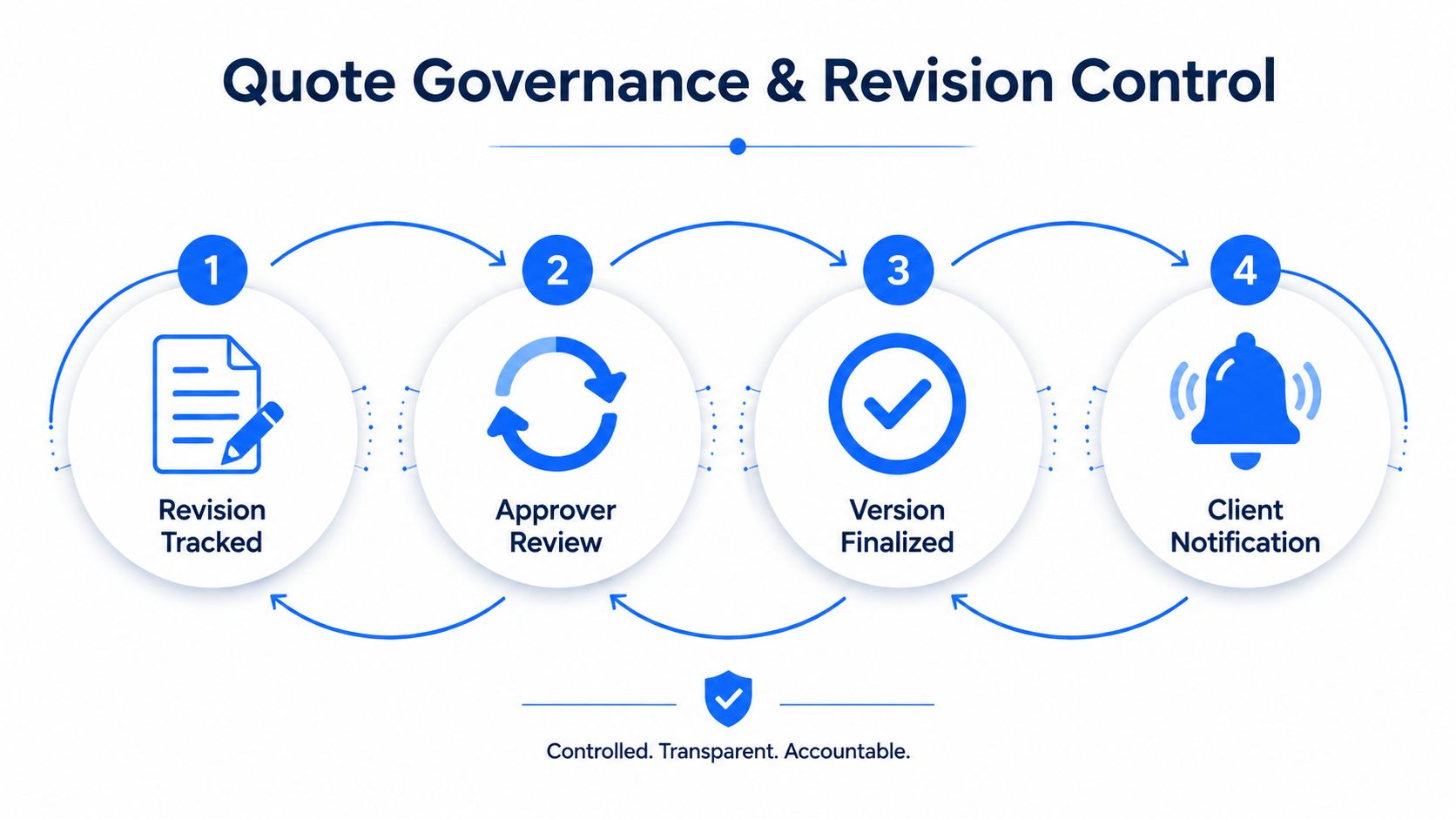
This is the difference between automation and governance. Automation creates a number. Governance preserves the reasoning behind that number.
Control that matters: If a customer changes the drawing, your team should see the cost impact before anyone sends a revised price.
Shops that skip this layer develop quote drift. The first version includes the correct setup and finishing assumptions. By the third or fourth revision, someone has changed the quantity or material but carried forward an old line item. The quote still looks professional, yet the original cost model no longer supports it.
Integrations That Matter for CNC and Fabrication Shops
A polished demo can hide a messy data path. Before signing, map one real RFQ from the customer's email to a booked job and count every manual touch.
Email and RFQ intake
The system should connect to the inboxes your team uses, including Outlook, Gmail, or customer portals. Ask whether it reads reply threads, recognizes attachments in later messages, identifies duplicates, and routes requests to the right estimator.
An RFQ dashboard should show what has arrived, what is being reviewed, what needs clarification, and what is waiting for approval. Without that visibility, automation may only move confusion into a newer interface.
CAD and drawing ingestion
Ask which files the platform can analyze and what it extracts from each one. STEP and IGES support may be enough for a CNC-only shop, but a mixed operation may need native CAD, 2D drawings, DXF files, BOMs, tolerances, and GD&T notes.
The key question isn't “How many formats do you support?” Ask, “What information do you preserve from this file, and where does it appear in the cost model?”
ERP and MES handoff
When a quote wins, approved quantities, materials, operations, routings, and notes should move into the next workflow without re-keying. BOM items should be available for inventory planning, and quote details should reach the job traveler in a usable format.
For a broader checklist, review this machine shop software stack guide. Your pilot should include a real handoff, not just a successful demo upload.
Accounting synchronization
Smaller shops often rely on QuickBooks Online, so accounting integration deserves direct testing. Confirm whether customers, quote totals, taxes, terms, and approved pricing move cleanly into the accounting workflow, or whether someone still copies values by hand.
A system that saves estimator time but creates office rework hasn't solved the whole problem. It has shifted the bottleneck.
Which Setup Fits Your Shop Best
Don't choose software by company size alone. Choose it by part mix, estimator count, revision risk, and how much downstream work your team can absorb.
Shop Profile | Recommended AI Setup | Must-Have Capability | Watch Out For |
|---|---|---|---|
Small CNC-only job shop | Focused AI quoting tool | STEP or IGES analysis, one-screen costing, QuickBooks Online handoff | ERP-grade complexity that your team won't use |
Mixed machining and fab shop | Mid-tier AI platform | 2D and 3D intake, unified labor and overhead, bending, finishing, and nesting review | Separate tools that split machining and fabrication assumptions |
Growing enterprise-focused job shop | ERP-integrated estimating platform | Role-based approvals, PO-aware estimating, revision traceability, and job handoff | Automation without governance or accountable approvals |
Small CNC-only shops
If you have a small estimating team and tight margin pressure, start with a focused tool. It should analyze common CAD formats, present setup, cycle time, material, tooling, and margin on one screen, and push approved figures into QuickBooks Online.
The deal-breaker question is: Can my estimator override cycle time and setup while preserving a record of the change? If the answer is no, the tool will either become a black box or sit beside your spreadsheet.
Mixed CNC and sheet metal shops
You need one queue for 2D and 3D work. The review screen should show machining operations alongside bending setup, material utilization, hardware insertion, deburring, and finishing.
The deal-breaker question is: Can the same quote compare CNC and sheet metal cost logic without forcing my team into separate databases? If not, your estimator may save time on one side of the shop while creating reconciliation work on the other.
Growing job shops
Enterprise customers expect structured documentation, predictable approvals, and clean handoffs. Choose a platform with role-based review, purchase-order context, ERP or MES integration, and a complete revision history.
The deal-breaker question is: Can I prove exactly which version and approval produced the price sent to the customer? If you can't answer that from the system, growth will increase quote risk along with quote volume.
One option for shops wanting a connected RFQ-to-quote workflow is Uptool, which analyzes emails, CAD models, drawings, and BOMs, then supports cost estimates, quote revisions, QuickBooks integration, and downstream digital travelers. Evaluate it against your own parts and approval process rather than buying on feature count.
A 90-Day Plan to Pilot AI Estimating Without Disrupting Production
Treat the rollout like a controlled machining job. Fixture the process, run a test cut, measure the result, then expand only after the output is stable.
Days 1 to 30, select and export
Choose one RFQ source, such as a shared inbox or a specific customer portal. Export five recent quotes with their original assumptions, actual costs, and final margins, then load them into the test environment.
Use a representative mix. Include a repeat CNC part, a multi-operation part, a sheet metal job with bending, and a quote with finishing or documentation requirements. The point isn't to make the software look good. It's to expose where your current cost library is incomplete.
Days 31 to 60, run parallel quotes
Let AI create the first draft while your estimator creates or reviews the human version. Log every override, including setup, cycle time, material yield, tooling, inspection, finishing, and margin.
This is also the stage to establish adoption rules. The practical AI adoption steps from DataTeams reinforce the value of a controlled rollout, clear ownership, and measurable workflow outcomes.
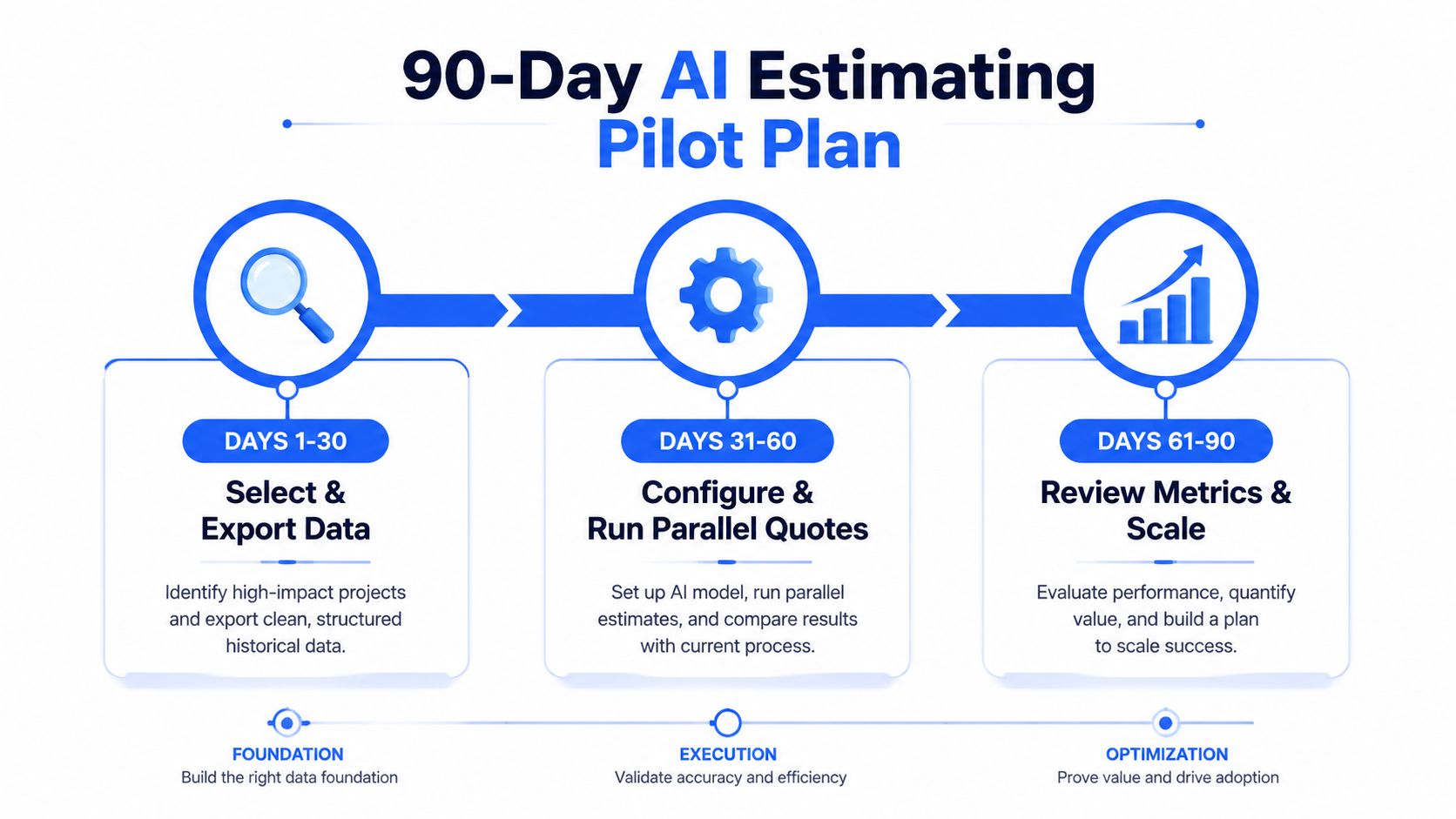
Days 61 to 90, scale the safe work
Move the most repeatable RFQ types to AI-led drafting with estimator spot checks. Keep a stop-list for work that always needs a human quote, including tight-tolerance parts, exotic alloys, and first-article jobs.
Track the measures that affect the business:
Quote turnaround: Record the hours from complete RFQ receipt to released quote.
Estimator overrides: Review which assumptions require correction and update the cost library.
Win rate: Compare quote outcomes using a consistent definition.
Revision quality: Check whether drawing and quantity changes are reflected before release.
Manual touches: Count re-keying between email, estimating, accounting, and job travelers.
End the pilot with a written policy. State what AI drafts, what humans own, which quotes need approval, and how every revision is tracked. That's the difference between adding software and building a quoting system.
Uptool helps machine and fabrication shops organize RFQs, analyze emails, CAD, drawings, and BOMs, and turn that information into traceable cost estimates and professional quotes. Visit Uptool to see how its connected quoting workflow can reduce manual re-entry while keeping your estimators in control of revisions, assumptions, and approvals.
