The worst quoting days all look the same. RFQs pile up in inboxes, a buyer wants an answer before lunch, and somebody on your team is still hunting through PDFs, old spreadsheets, and half-finished notes to figure out whether the part is a quick run or a job that will eat the afternoon.
That's why CNC estimating software matters now. Not because software is trendy, but because the first accurate quote usually wins attention, and shops using smarter quoting tools report shorter quote cycles and stronger win rates on tough RFQs worldmetrics.org/best/cnc-estimating-software. If you're still patching the process with spreadsheets, you're probably losing time in the exact spot where speed, consistency, and traceability decide margin.
Dimension | Spreadsheets | Estimating Software |
|---|---|---|
RFQ intake | Manual sorting across inboxes and folders | Centralized intake and routing |
Quote consistency | Depends on who built the sheet | Rules and templates standardize pricing |
Traceability | Assumptions get buried in cells and comments | Revision history and audit trails stay visible |
Speed | Fast for simple repeat work, slow for complex parts | Faster for messy RFQs and repeatable quotes |
Setup effort | Low upfront, but brittle over time | Higher upfront setup, cleaner long-term process |
Best fit | Very small volume, stable part families | Shops that need repeatable, defensible quoting |
Table of Contents
The Quoting Bottleneck Every Shop Owner Recognizes
A shop owner doesn't need a consultant to spot the bottleneck. It shows up as RFQs scattered across inboxes, a drawing covered in red pen, and an estimator who needs “a few minutes” that turns into half the afternoon. The issue is not effort. It is messy RFQs, missing details, and too many handoffs before anyone can trust the number.
The market has already made the case for better quoting tools. CNC software sits in a multi-billion-dollar global market, with one report valuing it at about USD 3.12 billion in 2023 and projecting USD 3.90 billion by 2032 Introspective Market Research. A second report from the same firm estimates about USD 3.5 billion in 2023 and nearly USD 7.8 billion by 2032 Introspective Market Research. That scale matters because quoting software is no longer a side tool. It sits inside the same budget and workflow decisions as the rest of the shop stack.
Speed is now a buying requirement
Recent industry analysis of automated CNC quoting says AI-assisted teams are reducing quote cycle time by 60% to 90%, and shops using smart quoting tools report 30% to 40% higher win rates on high-value RFQs worldmetrics.org/best/cnc-estimating-software. The same source says 78% of CNC buyers award work to the first accurate quote they receive worldmetrics.org/best/cnc-estimating-software. That is the whole game. The first accurate quote gets the customer's attention, and sloppy quoting hands that attention to someone else.
A clean example is how AAM structures production quotes. Different processes need different assumptions, but the rule stays the same. Good quoting starts with disciplined input handling, not a prettier spreadsheet.
Practical rule: if a quote takes more than one person to reconstruct, your estimating system is already leaking time and consistency.
The question is whether your current process still works when the RFQ is incomplete, the geometry is awkward, and the buyer wants an answer the same day.
What CNC Estimating Software Does
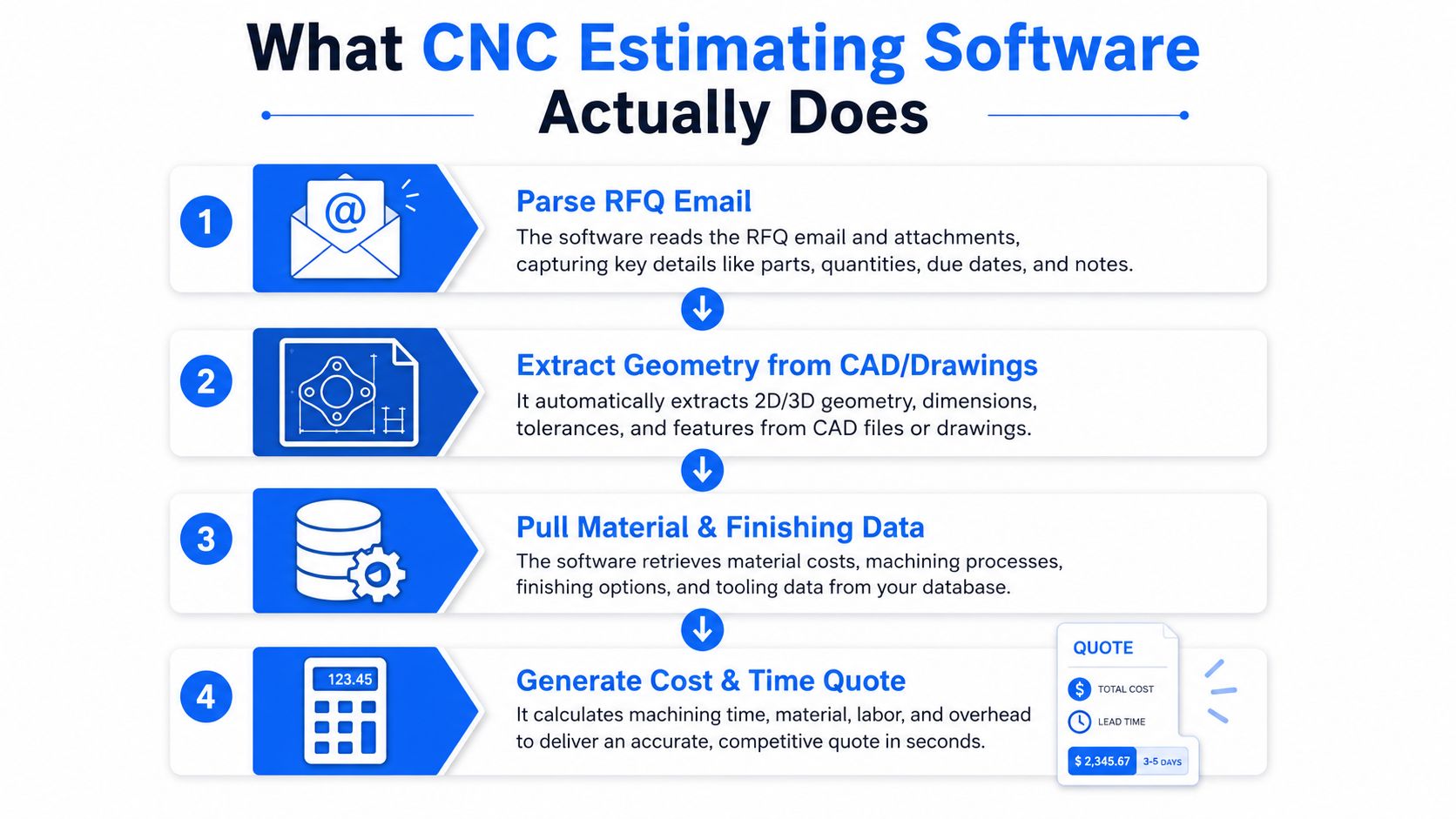
A shop gets an RFQ, and the work starts immediately. Someone has to decide whether the request is complete, sort out what the part really is, identify the material and finish, and map the operations before a price goes out. Miss any of that, and the quote is guesswork.
The jobs hiding inside one quote
A good estimating system handles RFQ intake, geometry extraction, material and finishing lookup, and cost generation. In shop terms, it takes the request, pulls features from drawings or CAD, matches the part against your material and finish rules, then gives the estimator a number to review before it leaves the building. That is a different job from a spreadsheet that only remembers what someone typed last time.
For CNC machining and sheet metal shops, the intake step matters because the cost drivers are not the same. Machined parts turn on tolerances and surface finish expectations, which change setup, tool selection, and cycle time. Sheet metal jobs hinge on bend count, bend-to-hole relationships, and forming limits, which shift the quote just as much as raw material.
Where manual estimating burns hours
Manual quoting wastes time in three places. The estimator types in the same part data again and again. The team leans on memory for operations, finish assumptions, and markup logic. The final quote sits in an inbox instead of a system you can trace later.
That is the part comparisons often miss. The question is not whether software can spit out a number. The question is whether it can turn messy RFQs into structured inputs an estimator can trust, then keep that logic tied to the job outcome for later review. If it cannot do that, you are paying for a prettier spreadsheet.
Spreadsheets Versus Estimating Software Side by Side
Spreadsheet quoting still survives because it's familiar. Everybody knows how to open one, and nobody needs training to type in a number. That convenience disappears fast when two estimators build different assumptions into the same job.
Dimension | Spreadsheets | Estimating Software |
|---|---|---|
Setup | Almost none | Needs configuration for parts, rates, and rules |
Quote consistency | Varies by estimator | Shared logic across users |
Traceability | Weak unless you build it yourself | Better audit trail and revision history |
Repeatability | Hard to enforce | Built to reproduce the same quote logic |
Speed on messy RFQs | Slow | Faster when intake is structured |
Long-term control | Depends on discipline | Built for process control |
Spreadsheets win when you need pure flexibility and you're quoting a narrow range of repeat parts. They also cost almost nothing up front. But once the quote process depends on tribal knowledge, you're exposed every time someone is out, rushed, or using an old template.
Estimating software wins when you need consistency, inbox integration, and fewer quote surprises. You do pay for setup, and the first rollout takes discipline. But once the system is built around your operations, it stops depending on who remembers the right rule.
The best software isn't the one with the longest feature list. It's the one that lets two estimators reach the same number without a debate.
If your team is small and your work is simple, a spreadsheet may still be enough. If your RFQs are messy, your customers expect fast answers, and your quotes need a defensible trail, software earns its keep quickly.
The Four Differentiators That Drive Accuracy
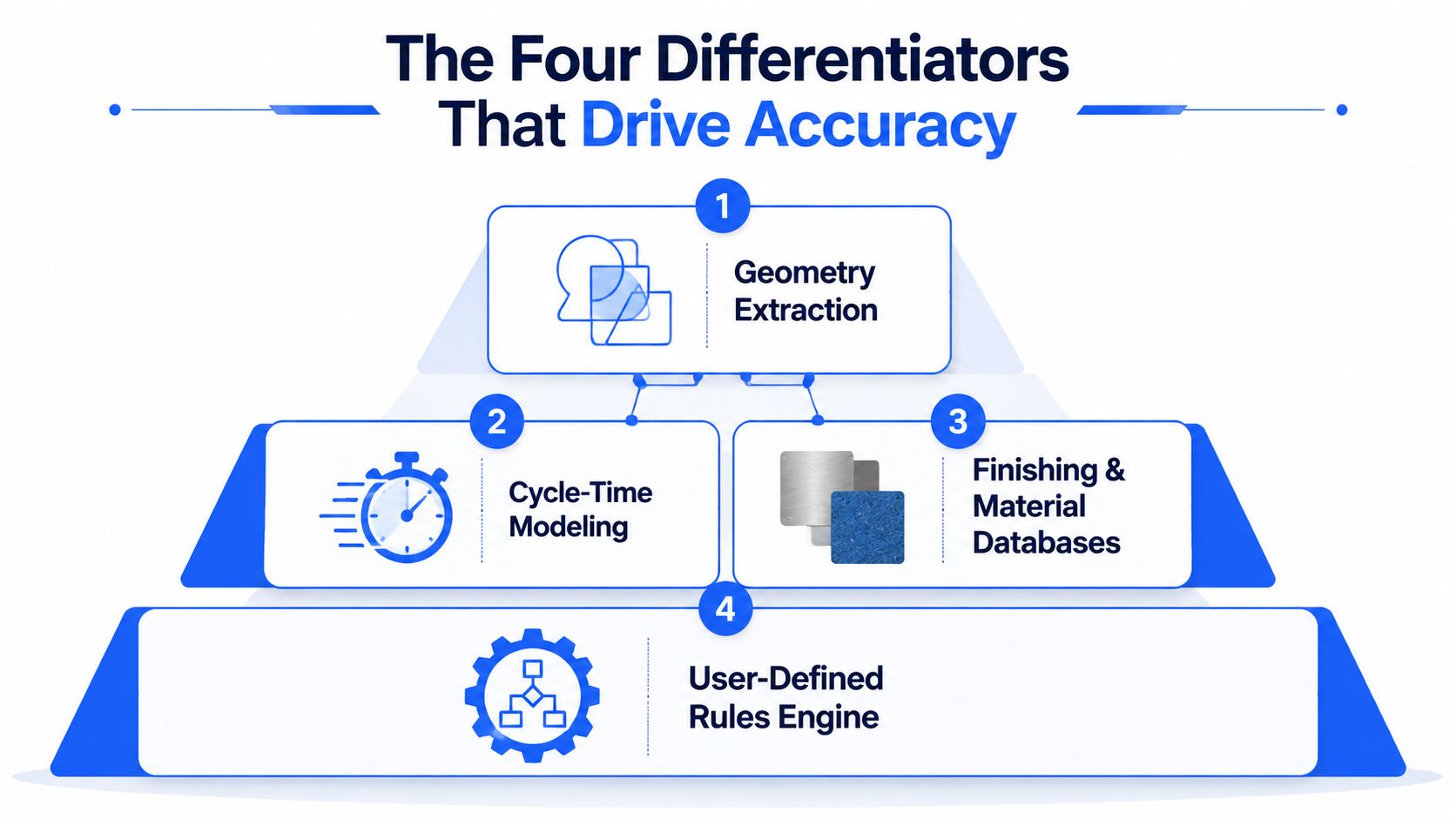
The demo looks polished until you force it into a messy RFQ. Accuracy comes from four places, geometry extraction, cycle-time modeling, finishing and material databases, and rules that keep the system consistent when the RFQ is incomplete. If one of those breaks, the quote drifts.
Geometry extraction
This is the front end. The software has to pull usable part information from drawings and CAD, then turn that into estimate inputs an estimator can trust. If the system makes someone rebuild the job by hand, you are paying for software and still doing spreadsheet work.
Sheet metal drawings make this painful fast, because small feature tolerances change how the job gets priced. A Protolabs guide shows features under 0.13 inches often use 0.005 inches for edge-to-edge, edge-to-hole, and hole-to-hole features, while thicker parts allow 0.015 inches for the same features Protolabs sheet metal design guidelines.
Cycle-time modeling and finishing data
CNC machining and sheet metal do not cost the same way. A published guide lists router tolerances at ±0.005 inches with a default surface roughness of 125 Ra Protochase CNC machining tolerances. For sheet metal, bending and forming bring their own limits, with bend-related tolerances commonly around ±0.020 inches and angularity around ±1 degree Xometry sheet metal design guide. If your system treats those jobs the same, it will miss the mark.
The better tools separate the work by process and carry the right rules into the quote. That is what keeps a rough RFQ from turning into a guess.
What to watch for in a demo
A vendor can talk about AI all afternoon. What matters is whether the software can extract geometry, model the job, and give the same number when another estimator runs it.
One benchmark-style claim for an AI geometric estimating engine says time and cost estimates can come back in under 90 seconds with stated accuracy of +/−10% US CADDI job shop management software. Treat that as a test target, not a promise. If the demo cannot show a clean path from messy RFQ to defensible estimate, keep looking.
How to Run a Real Demo Without Being Sold To
Most demos are theater. The rep loads a clean sample part, the software behaves beautifully, and everybody claps for a workflow nobody in your shop sees. Don't sit through that. Bring a real RFQ, preferably one that includes a weird revision, a missing note, or a tolerance that usually starts an email thread.
Start with a timing test. Give the vendor a real drawing and watch how long it takes to produce the first quote. Independent comparison guidance says lighter AI-assisted tools should let a shop produce a first real quote the same day, while heavier enterprise systems can take weeks to roll out because each machine, material, and rate has to be modeled Quotebuddy comparison guidance. That distinction matters. A tool that needs a long consulting project before it's useful is not a fit for a small shop that needs answers this week.
A demo checklist worth bringing in your pocket
Real drawing test. Time the quote on one of your own parts.
Second-estimator test. Ask another person to reproduce the number.
Tolerance handling test. Change a tight tolerance and see what costs move.
Material variant test. Swap stock or finish and check whether the logic follows.
Integration test. Confirm the quote can move cleanly from inbox to accounting or CRM.
The comparison guidance also recommends checking whether a second estimator can reproduce the number and whether the tool produces the same output from the same inputs Quotebuddy comparison guidance. That's the test most vendors hope you skip, because reproducibility exposes bad logic fast.
Practical rule: if two estimators can't get the same answer, the software hasn't solved quoting, it's just hidden the disagreement.
If you want a structured demo flow, the shortest path is to use a trial with your own data, not a sandbox with vendor samples. You can also use this demo checklist to keep the conversation on your parts instead of the rep's slide deck.
What to Look for by Material and Process
Machining and sheet metal quoting are different jobs. A vendor that treats them as one generic calculator is telling you the demo will be easier for them, not better for you.
CNC machining shops
For machining, the software has to understand toolpath-aware cycle time and finish requirements. If it only sees a bounding box and a guessed material, the quote falls apart as soon as the part needs extra setup, tighter finish, or awkward tool access. Even basic tolerance and finish settings change the work on the floor, not just the number on the quote.
Sheet metal fabrication shops
Sheet metal needs a different set of rules. Bend count, feature sensitivity, and thickness all affect whether the quote is realistic or fantasy. As noted earlier, the tolerances and bend behavior have to live in the estimate itself, because those details change cost before the job ever reaches the brake.
Finishing and material cost logic
Finishing is where quotes lose money. If the software cannot separate bare material, deburred work, plated work, or a special finish path, the estimate looks clean and the margin gets wrecked later. Material databases and finish logic belong in the quote engine, not in a comment field.
Material pricing needs the same treatment. A quoting tool should help you separate stock cost from the rest of the job logic, using a clear cost model instead of a loose guess. For a practical reference, see this material cost estimating guide. That matters when a part looks simple on paper but carries expensive stock, scrap, or handling in the shop.
If you mostly machine parts, judge the software on cycle time and setup realism. If you mostly bend and form sheet metal, judge it on tolerance behavior and bend-driven cost. If you do both, the tool has to handle both, or it is the wrong tool.
Matching the Right Tool to Your Shop Type
A small high-mix CNC shop under ten employees should prioritize intake speed, repeatability, and a system that doesn't need a long rollout. You don't need the heaviest platform on the market. You need something that pulls RFQs out of email, structures the part data, and lets one estimator trust the output without rebuilding every quote.
A growing job shop that mixes machining and sheet metal needs a stronger rules engine and a clean handoff from estimate to job. That kind of shop should care about revision control, material libraries, and whether the quote record can survive after the job starts. If the software can't support that loop, the future mess will show up as margin confusion later.
Precision fab shops with tight tolerance work need the most discipline of all. These shops should test geometry extraction, tolerance handling, and reproducibility harder than they test the user interface. A flashy dashboard won't save a quote that misreads a bend or underprices finishing.
If you want a broader map of how software stacks fit together, this machine shop software stack guide is worth a look. It helps you see where estimating belongs relative to the rest of the system.
The biggest mistake is buying the most feature-heavy tool when the real bottleneck is still RFQ intake.
One more thing. Uptool, Inc. is one option in this category, and it focuses on parsing emails, CAD, drawings, and BOMs to draft structured estimates and quotes. If your intake process is the mess, start there, not with a giant ERP project.
What to Buy, What to Skip, and How to Roll It Out
Buy the tool that fixes intake, structure, and quote consistency first. Skip anything that looks impressive but doesn't help your estimators handle messy RFQs faster or keep assumptions visible after the quote goes out. If the vendor spends more time talking about dashboards than input capture, move on.
The smartest buying conversation is the build-versus-buy one, and Technioz's build versus buy guide is useful if you're debating whether to assemble your own stack or take a ready-made quoting system. My view is simple. If your team is already buried in email, drawings, and revisions, don't build the first version yourself.
First 30 days after purchase
Lock the intake path. Route real RFQs into one place.
Standardize the assumptions. Define material, finish, markup, and lead-time rules.
Test reproducibility. Have two estimators quote the same part.
Track revision history. Make sure changes don't disappear into old templates.
Review actual job outcomes. Compare quoted logic to completed work and note where estimates drift.
Watch for version drift, buried assumptions in templates, and weak feedback from finished jobs. Those are the quiet failures that make a quoting system look successful while margins keep slipping.
If you want to stop wasting afternoons on manual RFQ cleanup, get serious about the intake problem first. Visit Uptool, Inc. to see how its quoting workflow handles email, drawings, CAD, and BOMs in one system, then decide whether it fits the way your shop quotes work.