Three RFQs hit the inbox before lunch. One is a machined aluminum bracket with a STEP file and a PDF. One is a sheet metal enclosure with finish notes buried in the title block. The third is a repeat part, but the customer changed a hole pattern and wants the revised price today. That's the exact moment when cutting time estimation decides whether your quote goes out fast, stays profitable, or turns into a rushed guess.
For a small shop, the pressure isn't abstract. Every minute spent tracing toolpaths, checking fixtures, and figuring out finish steps is a minute the customer is waiting. If the estimate is too slow, you lose speed. If it's too loose, you lose margin. ai cnc cycle /cutting time estimation matters because it sits right in that gap between “we think we know” and “we can defend this number.”
The good news is that AI is no longer just a buzzword in programming software. It's being used to read CAD models and drawings, infer part complexity, and produce a calibrated baseline for cycle time. The smarter shops aren't asking AI for a magic answer. They're using it to get to a strong first estimate faster, then checking that number against real machine limits, setup reality, and the rest of the RFQ.
Table of Contents
Introduction Why Cutting Time Makes or Breaks Your Quote
The part price starts with time. Material, setup, tool wear, programming effort, finishing, and inspection all hang off the cycle-time number in some way. If that number is wrong, the quote can be wrong even when every other line item looks careful.
That's why owners and estimators keep circling back to the same question, how do you turn a drawing or CAD model into a time estimate you can trust? In a high-mix shop, the answer can't be a slow manual process. It has to be quick enough for the customer's deadline and solid enough that you're not betting the job on a gut feel.
AI changes that starting point. Instead of starting with a blank screen and a manual guess, estimators can feed geometry, drawings, and part context into a model that spots complexity and gives back a first-pass number. That doesn't replace judgment. It gives the estimator a better baseline to review before pricing, routing, and response timing are finalized.
Practical rule: if the cycle-time number can't survive a quick shop-floor sanity check, it isn't ready for the quote.
For CNC machining and sheet metal fabrication, this matters even more because the quote isn't only about the cut. The estimate has to hold up across material, operations, and finishing, which is why the best workflow starts with time but ends with the full RFQ-to-quote package. That's the shift AI is making, from isolated estimating toward a more connected front end for manufacturing quotes.
How Cutting Time Estimation Really Works
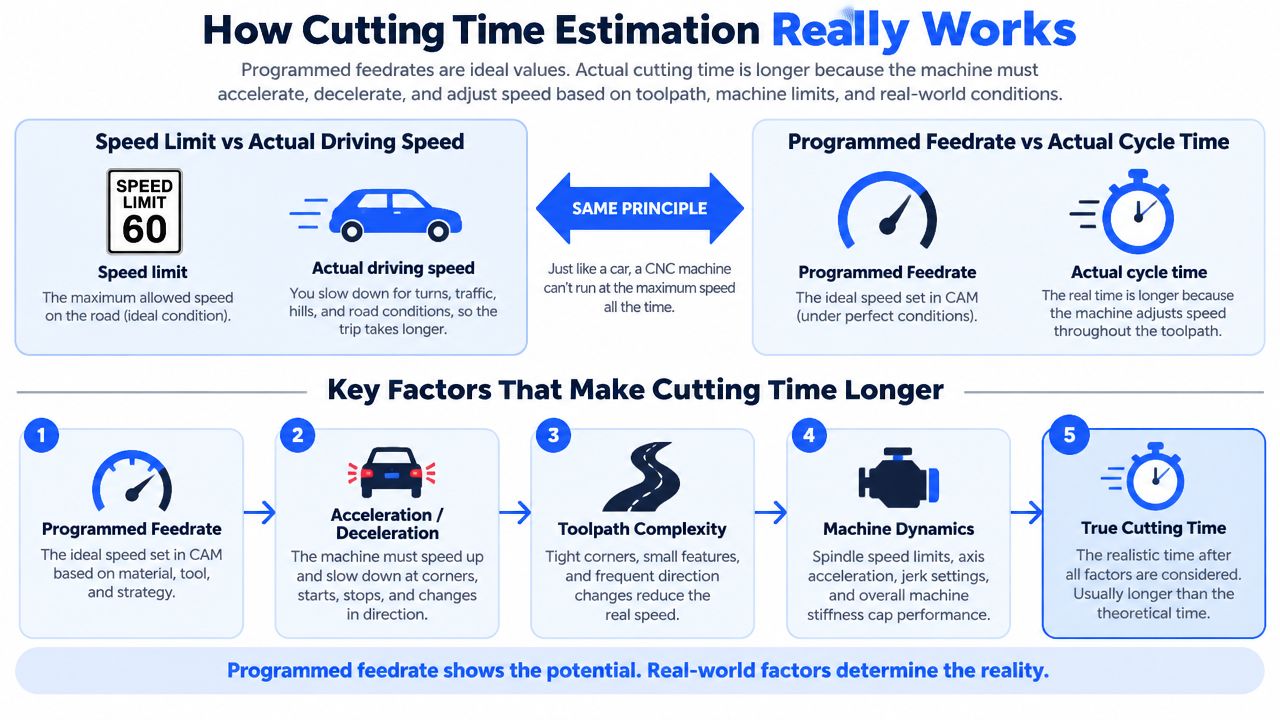
Many people think cycle time is just programmed feedrate multiplied by distance. That's like saying your drive to the shop is the speed limit times the miles on the odometer. In practice, traffic lights, corners, ramps, and stop-and-go driving change the trip time. Machines work the same way.
Programmed speed is not actual motion
CAM software often begins with the planned feed. That's useful, but it's still the ideal. The machine has to accelerate, slow down, change direction, and respect controller behavior, so actual cutting time usually stretches beyond the simple feed calculation. A 2022 industrial machining study in Robotics and Computer-Integrated Manufacturing showed that a data-driven neural network model for machine-tool feedrate behavior could estimate machining time with more than 90% accuracy on a representative industrial thin-wall component, using commanded feedrate, nominal acceleration, toolpath geometry, and measured feedrate as inputs (study summary).
That matters because it shows where older workflows fall short. The historical baseline in many CAM environments is still tied to programmed feeds and conventional assumptions, while the machine on the floor is dealing with acceleration, geometry, and controller limits. AI models are trying to learn that real behavior instead of pretending the plan and the cut are the same thing.
Actual cycle time lives in the gap between the CAM file and the machine's physical limits.
Why motion details change the quote
The important part for a shop owner is simple. A part with long straight moves behaves differently from one with tiny pockets, frequent direction changes, or delicate walls. The more the toolpath forces the machine to speed up and slow down, the more the actual time drifts away from the clean CAM estimate.
That's why modern ai cnc cycle /cutting time estimation is moving beyond average feed calculations and toward machine-specific dynamics. In plain terms, the software is learning how your machine behaves under load, not just how fast the code says it should move. For quoting, that means less blind trust in a static formula and more confidence that the first number reflects the part you're really going to run.
Uptool's CNC estimating software resources are useful if you want to see how estimation fits into a broader quoting workflow rather than a standalone calculation.
How AI Reads Your CAD and Drawings to Predict Time
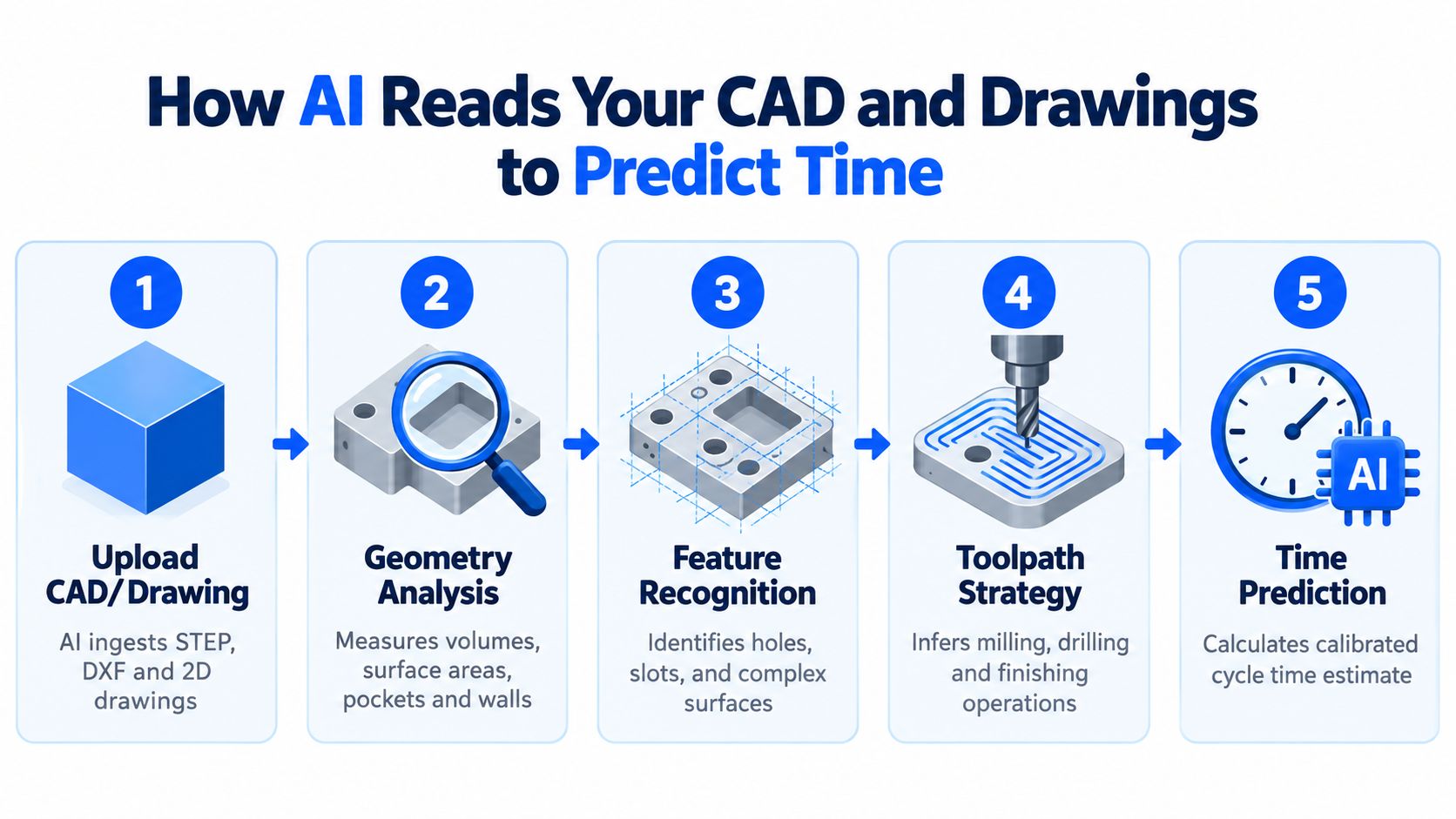
AI doesn't need a perfect shop-floor story to start estimating. It needs geometry, drawing data, and enough context to recognize what kind of work the part will demand. In practical terms, it looks for the signals a human estimator already uses, then processes them faster and more consistently.
Geometry tells the first part of the story
Machine Research describes a CAD-driven estimating workflow that accepts CAD, STEP, CATIA, X_T, and PDF files, then analyzes part geometry to produce programming, setup, and run-time estimates. Its workflow evaluates volumes, surface areas, pockets, and complexity from the uploaded part file (Machine Research). That lines up with how estimators already think. More pockets usually mean more tool changes. More surface detail usually means more finishing time. More geometric complexity usually means more opportunities for the machine to slow down.
AI is good at repeating that review step without fatigue. A human may spot the obvious features first, then miss small geometry that changes run time. A model doesn't get tired halfway through a batch of RFQs.
Drawings matter for sheet metal and finishing too
The drawing is where the estimate stops being only about machining. AMFG says its Sentinel AI can detect CAD geometry and title-block data and extract required secondary surface treatments directly from 2D PDF drawings, while Uptool says its platform uses material and finishing databases from distributors and finishers to inform pricing (AMFG launch coverage). That matters for sheet metal shops because finish requirements often sit in a note, not in the model.
If the system can read the drawing and identify finish or secondary operations, the estimator doesn't have to chase the same information manually across emails, PDFs, and markup comments. The AI can feed those details into a more complete quote package.
The fastest estimate is not the one with the fewest clicks, it's the one that captures the most real work the first time.
Uptool's AI estimating software overview fits into that same pattern, CAD and drawing inputs on one side, structured estimating output on the other. That's the bridge most shops need if they're trying to move from manual review to repeatable quoting.
AI Versus Traditional CAM Estimates on Accuracy and Speed
A shop can have two estimates for the same part and still get very different answers. Traditional CAM usually starts from the programmed toolpath and then relies on an estimator to adjust for setup, motion, and past experience. AI starts earlier, from geometry, drawings, and prior machine behavior, so the first number is often closer to what the floor will see.
The gap shows up in benchmark results. One study reported neural-network machining-time prediction for milling with errors within 2%, while the CAM software baseline had about 12% error. Another AI machining-time system estimated time from shape information without an NC program and stayed within 15 minutes across all 70 evaluation samples (study summary). These are benchmark-style results, not sales copy, and they show how much rough estimating can still leave on the table.
Traditional CAM Versus AI Cutting Time Estimation
Criteria | Traditional CAM Estimate | AI-Based Estimate |
|---|---|---|
Input basis | Programmed feeds and standard assumptions | CAD, drawings, geometry, and machine behavior |
Time to first pass | Usually slower and more manual | Faster, because the model can analyze features directly |
Accuracy trend | Can drift when motion gets complex | Can be much tighter when trained on real production data |
Best use | Familiar parts, simple review, baseline checks | High-mix quoting, complex geometry, faster first-pass timing |
Limitation | Depends heavily on estimator judgment | Still needs human review and shop-specific calibration |
For a shop owner, the practical difference is speed at the front end. If a quote depends on how quickly you can answer, AI shortens the first pass. If the part has lots of geometry or a long toolpath chain, AI also reduces the chance that a rough assumption pushes the estimate off course.
The estimator still matters. AI changes the starting line, not the finish line. Instead of spending the first hour building the number from scratch, the team can spend that time checking routing, confirming setup assumptions, and protecting margin before the quote goes out.
Why You Should Treat AI Time as a Calibrated Baseline
Blind trust in any estimate is a mistake, whether it comes from a spreadsheet, CAM software, or AI. The better mindset is to treat AI output as a calibrated baseline, then verify it against the specific machine, tooling, and setup on your floor. That shift matters more than the software brand.
A good benchmark here comes from recent machining guidance and ultra-precision research. Independent machining guidance recommends estimator output as a reviewable baseline rather than an unverified production number, which matches the FAQ owners ask all the time, how do I trust this for my machine, my tool condition, and my setup? A 2025/2026 data-driven CNC cycle-time model for ultra-precision milling still needed separate models for different interpolation types and cutting-experiment validation, even while reporting over 95% accuracy in its test set (estimator guidance). That tells you accuracy is conditional, not universal.
What to check before you trust the number
Machine limits: Make sure the estimate fits axis travel, spindle capability, and the controller behavior on that machine.
Holder clearance: A great time estimate means little if the holder forces the toolpath to back off in tight areas.
Finish targets: Surface quality expectations can change speeds, stepovers, and secondary passes.
Restart logic: Any pause, inspection, or recovery step can alter the actual cycle far more than a clean model shows.
Setup reality: Fixture access, part orientation, and operator motion all affect the final number.
The point is not to make AI smaller. It's to make it usable. A model can be very strong on one class of motion and weak on another, especially when the machine family changes. That's why shops get better results when they use AI to narrow the estimate, then use shop knowledge to finalize it.

Treat the first AI number the way you'd treat a new operator's first setup, promising, but still worth a second look.
From Estimate to Quote How Shops Use AI in On Demand Workflows
A cycle time estimate only helps if it reaches the quote screen quickly enough to win the job. In practice, that means the shop has to turn a rough RFQ into something usable before the customer moves on. The inbox usually brings a mix of CAD files, PDFs, revision notes, and questions about machining, finish, or downstream work.
AI now plays the role of a first-pass estimator, not a final judge. It gives the team a calibrated baseline, then the shop checks that number against machine limits, setup assumptions, and the rest of the job. CloudNC's launch of its Cycle Time Estimator points in that direction, with bulk timing and toolpath strategy generation in minutes for 3-axis and 3+2-axis parts showing that the goal is speed through the quoting queue, not just a number on a screen (CloudNC launch).
What the workflow looks like in a real shop
The RFQ arrives messy. One email thread may hold the CAD file, a drawing, a BOM, and a note about a revised finish.
AI reads the part context. Geometry, notes, and secondary requirements are pulled into one estimate record.
Cycle time becomes a baseline. The system produces the first machining or fab time.
Pricing gets built on top. Material, finishing, setup, and shop rules turn that baseline into a quote.
The estimator sends the response. The final review catches anything the model missed before the customer sees it.
That sequence matters because quoting speed changes who gets considered. AI-assisted quote generation has been reported to cut average manufacturing quote turnaround from 3.4 days to 3.7 hours, with simple quotes dropping to 22 minutes in automated systems. The point is not just faster math. It is getting a usable response into the customer's hands while the opportunity is still open.
For shops that want to see how this works in practice, the Valence Precision quoting workflow with Uptool shows how RFQ intake, CAD and drawing analysis, revision handling, and quote generation can sit in one workflow. That matters because a fast estimate still fails if it creates rework. The shop needs context, review, and a clean handoff from estimate to quote.
Putting AI Cutting Time Estimation to Work in Your Shop
The cleanest way to adopt AI here is to start where your quoting pain is already obvious. Pick the materials, parts, or finish-heavy jobs that show up most often, then compare AI baseline time against what your estimator would normally produce. That gives you a practical test without turning the shop into a software project.
Start with side-by-side review. Let AI produce the first timing pass, then have your estimator check machine limits, setup assumptions, and finish requirements before anything goes to the customer. That workflow keeps judgment in the loop and builds trust in the system over time.
If you want a broader framework for the operational side of this, the manufacturing automation roadmap guide is a useful way to think about where estimating fits inside a larger process upgrade. Estimating doesn't live alone. It connects to inbox handling, job routing, pricing, and job release.
For CNC and sheet metal shops, the main win is not just faster math. It's a more disciplined quoting process that turns scattered input into a reviewable baseline, then into a quote your team can stand behind. When that works, the estimate stops being a bottleneck and starts being part of the shop's competitive edge.
If you want to bring AI-assisted quoting into your own workflow, Uptool offers a way to parse RFQs, analyze CAD and drawings, and keep revision history tied to the estimate record. Visit Uptool to see how it fits CNC and fabrication quoting in a real shop environment.
