Siemens NX CAM is the choice for deep multi-axis machining, Mastercam is the choice for rapid toolpath and finish control, and Autodesk Fusion is the practical entry point for budget-conscious shops that want affordable, cloud-ready access. The right software for a CNC milling machine is the platform that connects quoting, revisions, programming, inspection, and production, not just the one with the longest feature list.
You've probably felt the problem already. An RFQ arrives with a STEP file, a drawing, a material requirement, and a finishing note buried in an email thread. Someone estimates the raw stock, someone else checks whether the mill can reach the features, and a programmer later discovers that the customer revised a hole pattern after the first quote. The cutting strategy may be sound, yet the shop still loses time because the wrong revision reaches the floor or the estimator prices a process that production can't repeat profitably.
A CAM package remains central to CNC milling, but it sits inside a wider operating chain. The strongest choice depends on your geometry, machines, tolerance requirements, programmers, quoting process, and ability to maintain a reliable record from RFQ through shipped part.
Shop priority | Strong fit | Practical reason | Main trade-off |
|---|---|---|---|
Complex multi-axis machining | Siemens NX CAM | Deep machining capability and simulation-backed programming | Higher adoption and training demands |
Fast toolpath generation and finish control | Mastercam | Flexible programming and strong finishing workflows | Requires disciplined post-processor and revision management |
Affordable CAD/CAM access | Autodesk Fusion | Integrated, cloud-ready environment with lower friction | May be less suitable for the most demanding machining work |
Connected quoting and job handoff | CAM plus a quoting or ERP layer | Keeps part data, costing, revisions, and travelers aligned | Integration still needs ownership and process rules |
Table of Contents
Why Software Choice Defines Your Shop's Workflow
The daily pressure starts before a programmer opens CAM. A customer wants a quote quickly, your estimator is checking material availability, and production wants to know whether the part needs three-axis milling, indexed work, secondary drilling, deburring, or outside finishing. If the software only generates toolpaths, it leaves the most expensive handoffs untouched.
Consider a repeat aluminum bracket with a revised pocket and a new surface-finish callout. The estimator may update the material and machining time, while the programmer imports a newer CAD file into a separate CAM project. If the revision number isn't carried into the setup sheet, the operator can run a valid program against an obsolete drawing. The resulting part might be machined accurately and still be wrong.
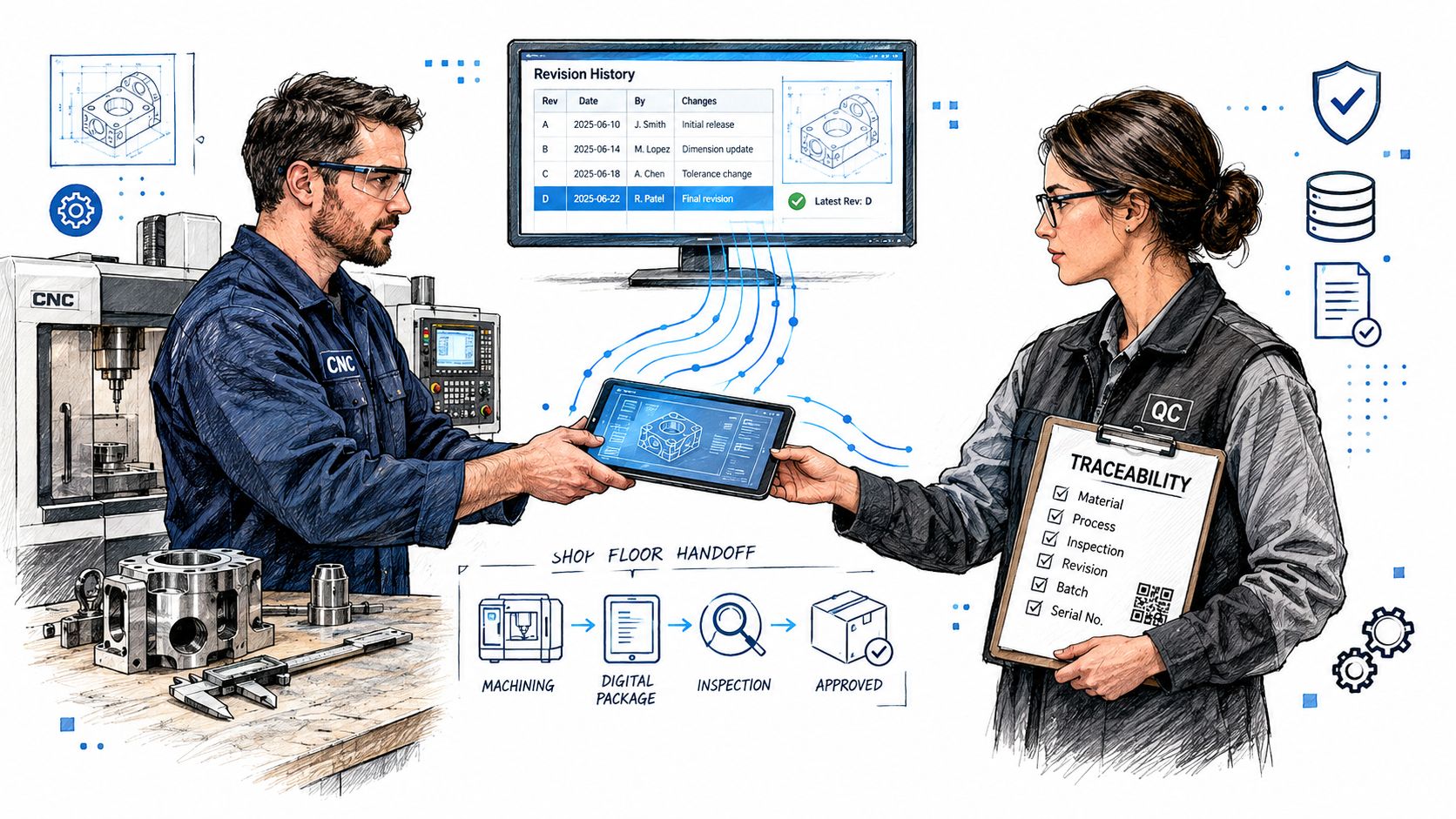
The cost of a disconnected handoff
A disconnected workflow creates several failure points:
RFQ interpretation: Material, quantity, tolerances, and finishing requirements remain scattered across email, drawings, and notes.
Programming handoff: The CAM programmer may not see the estimator's assumptions about setups, stock, or outside operations.
Revision control: A renamed file doesn't prove that the shop used the latest approved geometry.
Production traceability: Operators and inspectors need access to the same revision, setup information, tooling notes, and inspection requirements.
Cost feedback: Actual problems on the floor rarely flow back into the estimating database, so the next quote repeats the same mistake.
This is why workflow efficiency is a useful lens when reviewing manufacturing software. Practical guidance on workflow efficiency strategies can help you evaluate ownership, handoffs, and repeatable procedures alongside the software itself.
Treat the RFQ as the first production record
The best workflow starts by treating the RFQ as structured manufacturing data. A 3D model describes geometry, but a drawing often controls tolerances, threads, surface finish, material condition, and inspection requirements. The quote should preserve those assumptions, then pass them forward to the job rather than forcing production to reconstruct them.
That changes how you assess software for CNC milling machine work. Ask whether the system can associate the model, drawing, estimate, revision, toolpath, post-processed program, setup sheet, and inspection record. A visually impressive toolpath won't compensate for missing context when a customer changes a feature midstream.
Practical rule: If a programmer or operator has to ask which file is current, your software stack has already lost traceability.
A shop doesn't need every task in one application. It does need clear ownership of the record and dependable connections between applications. CAM handles machining logic, while quoting, ERP, DNC, inspection, and document control must exchange the information people use.
The CAM Software Market and Connectivity Trends
The market signals show why CNC milling deserves serious software planning. One major analysis estimates the global CAM software market at US$3,642.84 million in 2025, with projected growth to US$9,172.52 million by 2034 at a 10.8% CAGR during 2026–2034. The same market reference also reports end-user payments rising from $2.9 billion in 2024 to $3.1 billion in 2025, with a projection of $3.4 billion in 2026, representing 8.3% growth that year. These are different market measures, so they shouldn't be treated as interchangeable, but both point to continued investment in CAM. The Insight Partners CAM software market analysis provides the underlying figures.
Milling remains the central use case. A global CAM market summary reports milling as the leading manufacturing process in 2024, with a 30.12% revenue share. It also places cloud-based and SaaS solutions at 36% of global CAM revenue, while standalone CAM software accounted for 37% in the same year. In North America, one estimate values the CAM software market at $1,265.7 million in 2024, projecting $1,803.2 million by 2029 at a 6.1% CAGR. The U.S. estimate moves from $1,058.7 million in 2024 to $1,429 million by 2029, at a 5.1% CAGR. This market summary contains those regional and process figures.
Why machine-side continuity matters
The most useful market signal isn't just growth. Machine-side programming tools were the largest tool category in 2026 at 29.0% share, according to coverage of the CNC management software market. That suggests buyers care about the path from digital instructions to validated machine activity, not just the ability to create a complex toolpath.
For a small shop, connectivity means more than an API checkbox. It means the job number survives the transition from estimate to CAM project, the program carries the correct revision, and the operator can identify which file was approved. It also means engineering, estimating, programming, quality, and production can work from aligned information without creating private spreadsheets that no one else can audit.
The shift toward connected manufacturing is also visible in the March 2025 partnership between Autodesk and Siemens Digital Industries Software, which aimed to connect Fusion 360 with Siemens Xcelerator. A manufacturing technology overview is useful background for evaluating this wider move toward connected systems.
AI and cloud need disciplined inputs
AI and machine learning are being applied to toolpath optimization, predictive maintenance, and anomaly detection, while cloud CNC software is gaining attention for accessibility, collaboration, and scalability. Those capabilities don't remove the need for human review. An automated recommendation is only as reliable as the material, geometry, tooling, machine, and process information behind it.
Simulation software illustrates the same pattern. The market is projected to grow from $2.1 billion in 2025 to $4.2 billion by 2034, and cloud deployment represents 41.8% of that segment, valued at $877 million in 2025, according to industry coverage of CNC machine software. For estimators, the practical question isn't whether a product includes AI. It's which assumptions the system can automate and which ones a qualified person must verify.
Comparing Top CNC Milling Software Options
The three platforms most often shortlisted for serious milling work occupy different positions. Independent 2026 comparisons consistently place Siemens NX CAM, Mastercam, and Autodesk Fusion among the strongest options because they combine multi-axis support, automated toolpath generation, and simulation-backed NC programming. Their value depends on the work you sell.
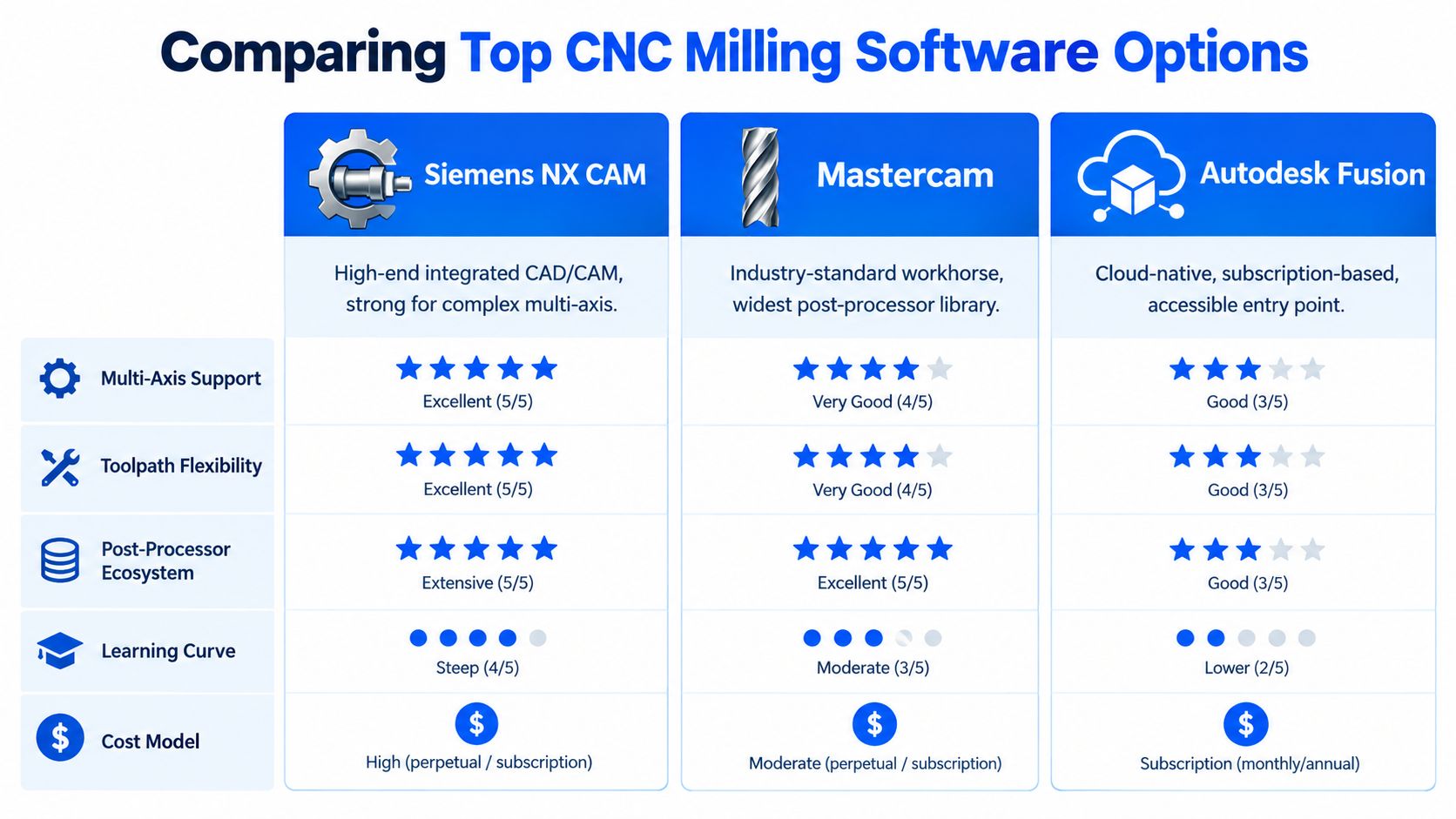
Evaluation point | Siemens NX CAM | Mastercam | Autodesk Fusion |
|---|---|---|---|
Best operational fit | Complex, high-value multi-axis work | Mixed job-shop work needing fast edits | Smaller teams and accessible CAD/CAM |
Machining depth | Strongest for complex strategies | Broad and flexible | Capable for common milling workflows |
Toolpath emphasis | Advanced control and integrated programming | Rapid generation and finish control | Lower-friction programming and collaboration |
Adoption profile | Requires experienced users and structured rollout | Familiar workhorse for dedicated programmers | Easier entry for teams with limited CAM overhead |
Main commercial trade-off | Depth versus cost and complexity | Capability versus training and process discipline | Accessibility versus limits on demanding work |
The comparison published by Elephant CNC scores Siemens NX CAM highest for combined strength and weakness coverage, with S=5 and W=5. Mastercam scores best for rapid toolpath generation and finish control, with R=5 and F=5, while Autodesk Fusion scores highest for affordability and availability, with A=5. The practical trade-off is clear: major shops usually choose between maximum machining depth and lower-friction adoption.
Siemens NX CAM
NX makes the most sense when the shop earns its margin on complicated parts, multi-axis access, strong simulation, and controlled engineering-to-manufacturing data. Its depth can justify the investment when a bad setup, collision, or revision mistake carries serious cost. It can be excessive for straightforward three-axis work where the team needs quick programming more than a broad enterprise environment.
The hidden question is implementation. A powerful system still fails if only one programmer understands it, if post-processors aren't validated on the actual machines, or if the shop doesn't define how revisions move from engineering to production.
Mastercam
Mastercam remains a practical choice for job shops that handle varied work and need programmers to adjust strategies quickly. Its strongest evaluated traits are rapid toolpath generation and finish control, which matter when a quote turns into a short-run job with changing priorities. It works well when the shop has people who know the system and can maintain a disciplined library of tools, templates, posts, and setup standards.
Mastercam isn't a substitute for document control. Fast programming can make an uncontrolled revision move even faster, so the CAM project still needs a clear link to the approved model and drawing.
Autodesk Fusion
Fusion gives budget-conscious shops a lower-friction path into integrated CAD/CAM and cloud-based collaboration. That can suit a small team where the same person quotes, models, programs, and supports the machine. It also helps reduce the handoff between design and programming when changes arrive frequently.
Its trade-off appears when jobs demand the deepest multi-axis control, very large assemblies, or highly specialized machine behavior. Before committing, test representative parts and confirm the post-processor output on the target machine. For shops assessing indexed work, this fifth-axis milling resource offers useful context for the machining demands involved.
Quoting software can complement any of these platforms rather than replace them. A system such as Uptool can parse RFQ emails, CAD models, drawings, and BOMs into organized estimates, while material and finishing databases inform the commercial assumptions before the job reaches CAM. That bridge matters because CAM knows how to cut the part, but it doesn't automatically know whether the quote captured masking, powder coating, inspection, or outside processing.
Aligning Software with Machining and Fabrication Constraints
A CAM demo can look excellent while hiding the question that determines whether the part will pass inspection. You need to test the software against your materials, machine behavior, tooling, surface-finish callouts, sheet metal operations, and finishing requirements.
A comparative study found average geometric deviation ranging from 0.004 mm to 0.008 mm, maximum deviation from 0.009 mm to 0.015 mm, processing speed from 25 to 45 parts per hour, and resource usage from 60% to 80% across tested CAM solutions. Those ranges show why a buyer should evaluate both precision and workstation efficiency, not just the number of strategies listed on a product page. The comparative CAM study provides the measured ranges.
Start with the finish requirement
Surface finish is commonly specified by Ra. General machined surfaces often cluster around Ra 3.2 µm (125 µin), while finer functional surfaces commonly use Ra 1.6 µm (63 µin). Lower callouts such as Ra 0.8 µm (32 µin) and Ra 0.4 µm (16 µin) are more often associated with precision finishing processes than routine milling, as explained in this surface-finish guide.
Your test should include the actual material and tool library assumptions. Check whether the simulation reveals remaining stock, whether the finishing strategy maintains the required engagement, and whether the posted code matches the control's behavior. A smooth animation isn't proof that the machine will produce the required finish.
Add sheet metal and coating rules to the quote
A shop that mills parts and fabricates sheet metal needs separate logic for cutting, forming, assembly, and finishing. One commonly cited dimensional-control rule says cut-edge deviation shouldn't exceed 0.005 inch per foot, approximately 42 µm per centimeter of cut length. This sheet metal fabrication guide explains why variation accumulates across long edges.
Precision sheet metal work is often quoted around ±0.010 inch to ±0.020 inch for standard laser-cut features, with precision work around ±0.005 inch to ±0.010 inch. Bend angle targets are commonly around ±1.0° for standard work and ±0.5° for precision work, according to this sheet metal tolerance reference.
Powder coating adds another overlooked variable. One published reference states that coating can add +0.05 to +0.08 mm per coated surface, and recommends plugging critical holes before coating because the added thickness can change fit. The coating and tolerance reference supports that rule.
Shop-floor test: Put one real part, one real drawing, and one real finishing route through the complete workflow. Check the estimate, setup, program, traveler, inspection instruction, and revision record together.
Integrating Quoting, ERP, and Production Workflows
The most valuable connection in a small shop is often the one between sales and production. A quote begins with incomplete information, but the job eventually needs a defined material, operation sequence, outside process, inspection requirement, delivery expectation, and revision history. If those details stay in separate inboxes and spreadsheets, the shop relies on memory to close the gaps.
A connected quoting workflow can extract geometry and key inputs from 3D CAD, 2D drawings, and BOM files, then present those inputs for estimator review. The estimator still decides whether the proposed setup, tooling, programming time, scrap allowance, material source, and finishing route make sense. Automation speeds the first pass, but it shouldn't hide assumptions.
Build one chain from inquiry to traveler
A useful chain looks like this:
RFQ intake: The system detects incoming requests, groups the files, and identifies what needs action.
Part interpretation: CAD, drawings, and BOMs are reviewed together, not as disconnected attachments.
Cost construction: Material, milling operations, sheet metal steps, finishing, inspection, and outside services are priced using defined rules.
Human approval: An estimator checks geometry, tolerance risk, machine fit, and commercial terms.
Revision handling: A customer change creates a visible version rather than replacing a file without notice.
Production release: The approved information becomes a traveler or job packet that programming and production can follow.
Feedback: Actual issues, added operations, and finishing problems are recorded for future estimates.
This structure also helps align the front office with accounting. QuickBooks integration, for example, can keep quote and customer records closer to the back-office system of record, while a digital traveler gives production the context behind the price.
Choose ERP boundaries deliberately
ERP systems vary in scope. Some focus on finance and inventory, while others extend into manufacturing planning, scheduling, purchasing, quality, or shop-floor execution. Before selecting an integration, review a practical types of ERP systems list and write down which system owns each record.
Don't assume that the ERP should own every manufacturing detail. A quoting platform may be better at RFQ intake and estimate construction, CAM should own toolpath creation, a DNC or program-management layer may control machine delivery, and the ERP may own the job, purchasing, invoicing, and broader resource records. The integration is successful when those boundaries are explicit and the revision identifier travels with the job.
Keep humans in the approval loop
AI-assisted estimation can identify likely operations, materials, and process inputs, but it won't know every fixture limitation or customer-specific acceptance rule without reliable shop data. The estimator should be able to edit the assumptions, record why a route changed, and preserve the original context.
That is especially important when a customer revision arrives after programming begins. The team needs to see what changed, what was re-quoted, which program is affected, and whether material or finishing costs need adjustment. Traceability isn't administrative overhead. It protects margin and prevents production from solving a commercial problem at the machine.
Selecting the Right Stack for Your Shop's Growth
Choose the stack around the work that makes or loses money. A shop running complex multi-axis components may justify Siemens NX CAM because machining depth, simulation, and controlled data exchange outweigh adoption friction. A mixed job shop that values fast edits and finish control may prefer Mastercam. A smaller team that needs affordable CAD/CAM access and cloud collaboration may find Autodesk Fusion sufficient for its current work.
The CAM decision is only one layer. Your evaluation should also cover quoting, revision control, program delivery, inspection, accounting, and production feedback. A capable toolpath engine paired with weak handoffs still leaves the owner exposed to wrong revisions, unpriced operations, and untraceable rework.
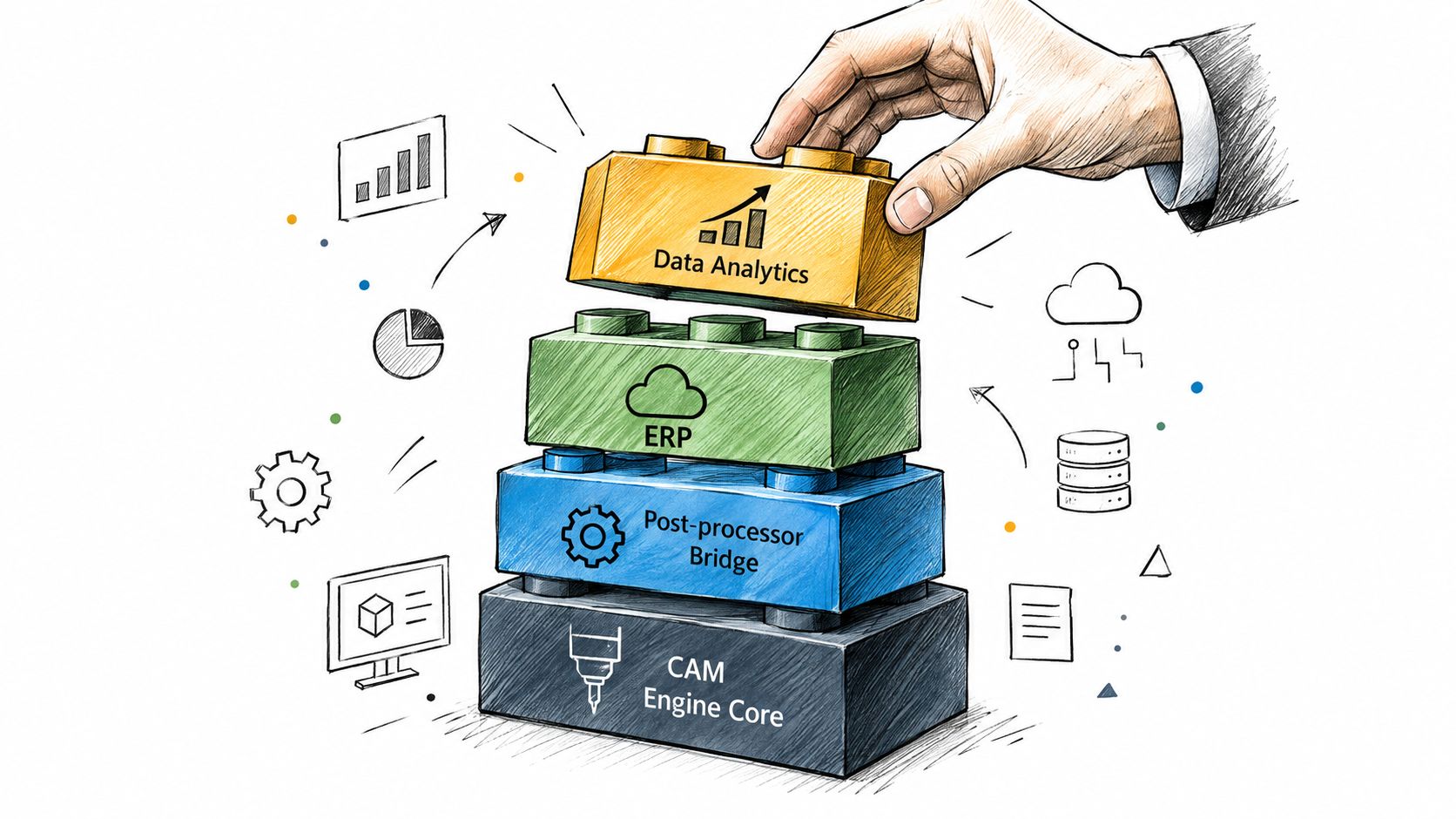
Use a practical selection checklist
Match the geometry: Test the parts you sell, including multi-axis features, pockets, holes, curved surfaces, and difficult finishes.
Validate the machine output: Confirm the post-processor for each target control, then simulate the posted code against the machine and fixture.
Measure adoption friction: Ask who will program, who will maintain libraries, and how quickly another employee can understand a released job.
Protect revision history: Require visible links between the RFQ, quote, model, drawing, CAM project, NC file, traveler, and inspection record.
Connect commercial and technical data: Make sure material, setup, programming, finishing, and outside-process assumptions move from quote to job.
Define human approval: Decide which AI or automated recommendations require estimator or programmer sign-off.
Pilot the complete flow: Don't test only a toolpath. Run an RFQ through quote, revision, program release, production, and inspection.
For broader business planning, a curated overview of tools for growing your business can help place manufacturing software alongside accounting, communication, and operational systems. For the manufacturing-specific view, this machine shop software stack guide is a useful reference when mapping the layers around CAM.
The right choice preserves estimator oversight while reducing manual re-entry. It lets the programmer work from approved geometry, gives the operator clear release information, and lets the owner trace a margin problem back to its source. That is more valuable than buying advanced features the team can't adopt or verify.
Uptool connects RFQ intake, CAD and drawing analysis, AI-assisted estimating, material and finishing data, revision history, digital travelers, and accounting handoff for CNC machining and fabrication shops. Visit Uptool to see how a more traceable RFQ-to-quote workflow can fit alongside your CAM and production systems.